← All endpoints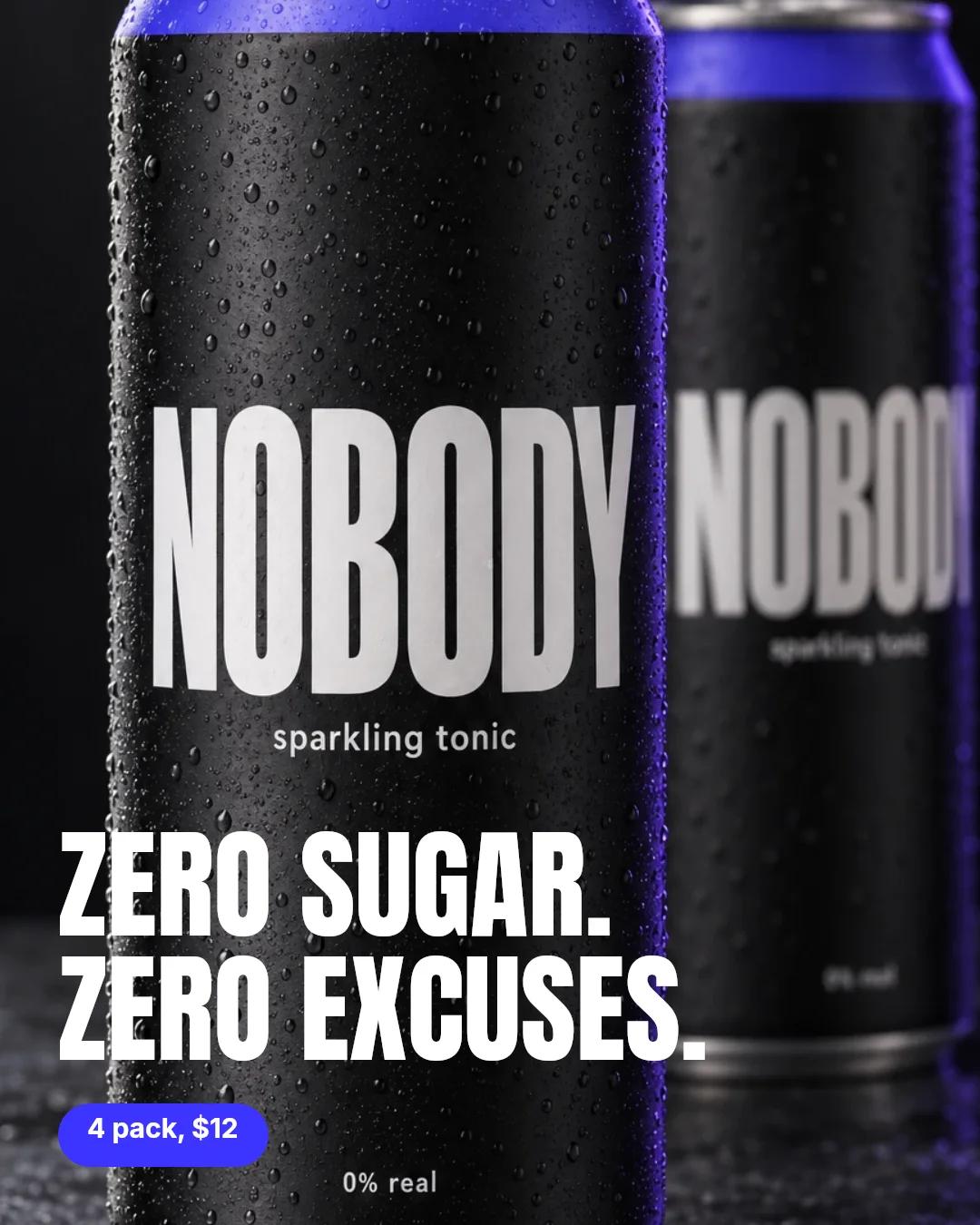
API endpoint
Compositor
Send layers as JSON, get a finished image in seconds
- What goes in
- Layers: images from any public https link, text with real fonts, shapes, and the canvas size.
- What comes out
- One PNG on our CDN.
- What it costs
- 0 credits today. Limits apply per account. Free accounts get a small Made with Wireflow mark on the file. Paid accounts do not.
The call
Plain HTTP, no SDK to install. Set WIREFLOW_API_KEY first. The key needs workflows:write, workflows:execute.
Copy the starter board, once
Layers render on a compositor node on a board you own, and this gives you one. Use the id it returns as WORKFLOW_ID below. It also has one image model on it, not wired to anything. Delete it before you run the whole board, or it bills.
curl -X POST https://www.wireflow.ai/api/v1/workflows/cmsmqfs230007ky04n6yirtkv/duplicate \
  -H "Authorization: Bearer $WIREFLOW_API_KEY" \
  -H "Content-Type: application/json" \
  -d '{}'
Response
{
  "data": { "id": "WORKFLOW_ID", "…": "…" }
}
Compose
Send the layers, get the PNG. This call made the sample above. Nothing on the board changes.
curl -X POST https://www.wireflow.ai/api/v1/workflows/WORKFLOW_ID/compositor/preview \
  -H "Authorization: Bearer $WIREFLOW_API_KEY" \
  -H "Content-Type: application/json" \
  -d '{
  "nodeId": "n2",
  "stage": {
    "width": 1080,
    "height": 1350
  },
  "inputs": {
    "background": "https://cdn.wireflow.ai/landing/api/input-nobody-can.webp"
  },
  "layerOrder": ["background", "headline", "pill", "price"],
  "layers": {
    "background": {
      "type": "image",
      "x": 0,
      "y": 0,
      "width": 1080,
      "height": 1350,
      "fit": "cover"
    },
    "headline": {
      "type": "text",
      "text": "ZERO SUGAR.\nZERO EXCUSES.",
      "x": 64,
      "y": 900,
      "width": 952,
      "height": 290,
      "fontFamily": "Anton",
      "fontSize": 132,
      "lineHeight": 1.04,
      "fill": "#ffffff"
    },
    "pill": {
      "type": "rectangle",
      "x": 64,
      "y": 1216,
      "width": 232,
      "height": 70,
      "fill": "#3b35ff",
      "cornerRadius": 35
    },
    "price": {
      "type": "text",
      "text": "4 pack, $12",
      "x": 96,
      "y": 1233,
      "width": 200,
      "height": 36,
      "fontFamily": "Inter",
      "fontSize": 30,
      "fontWeight": "bold",
      "fill": "#ffffff"
    }
  }
}'
Response
{
  "data": {
    "url": "https://cdn.wireflow.ai/workflow-composites/…png",
    "width": 1080,
    "height": 1350,
    "watermarked": false,
    "layersVerified": true
  }
}
Keep the layers on your board
Save them on the node, so the canvas opens with your layout. This saves no picture: point the Import node at your image, or pass `inputs` on each call.
curl -X PATCH https://www.wireflow.ai/api/v1/workflows/WORKFLOW_ID/nodes/n2 \
  -H "Authorization: Bearer $WIREFLOW_API_KEY" \
  -H "Content-Type: application/json" \
  -d '{
  "data": {
    "stage": {
      "width": 1080,
      "height": 1350
    },
    "stageDeclared": true,
    "layerOrder": ["background", "headline", "pill", "price"],
    "layers": {
      "background": {
        "type": "image",
        "x": 0,
        "y": 0,
        "width": 1080,
        "height": 1350,
        "fit": "cover"
      },
      "headline": {
        "type": "text",
        "text": "ZERO SUGAR.\nZERO EXCUSES.",
        "x": 64,
        "y": 900,
        "width": 952,
        "height": 290,
        "fontFamily": "Anton",
        "fontSize": 132,
        "lineHeight": 1.04,
        "fill": "#ffffff"
      },
      "pill": {
        "type": "rectangle",
        "x": 64,
        "y": 1216,
        "width": 232,
        "height": 70,
        "fill": "#3b35ff",
        "cornerRadius": 35
      },
      "price": {
        "type": "text",
        "text": "4 pack, $12",
        "x": 96,
        "y": 1233,
        "width": 200,
        "height": 36,
        "fontFamily": "Inter",
        "fontSize": 30,
        "fontWeight": "bold",
        "fill": "#ffffff"
      }
    }
  }
}'
Response
{
  "data": { "node": { "id": "n2", "…": "…" }, "nodeState": { "…": "…" } }
}