How to Get Your Real Voice Into a Seedance 2.5 Video (What Actually Works, August 2026)

Michael Aubry
In this article▾
By Michael Aubry, co-founder of Wireflow. Everything below was built, measured, and shipped in Wireflow. The full workflow is public at the bottom of this post.
I spent about 1,500 credits and three days trying to make an AI-generated action video speak in my actual voice. Not a clone that sounds sort of like me. My voice, on a rider tearing through the scene, sounding like it belongs there.
Everything I tried first failed in instructive ways. Here's the complete map, including the technique that worked on the first take, so you don't pay for the same lessons.
How Seedance 2.5 audio references actually work
Seedance 2.5 audio references guide tone, timbre, pacing, and speaker style. They do not preserve your recording. The model regenerates a new voice with similar characteristics, so handing it a voice memo does not put that voice memo in your video.
We confirmed this with paid runs, and found the rule that matters most, the one nobody tells you:
Audio reference reproduction in Seedance 2.5 is positional, not length-based. A reference bound to a close-up, low-action moment reproduced near-verbatim, 3 out of 3 across our runs. The same reference against a wide action shot with wind and engine in the staging got recomposed every single time, 0 out of 3. If the model is staging chaos, your reference is a suggestion. If it's staging a face talking to camera, your reference mostly survives.
Two smaller rules that cost real credits to learn:
- Mute your video references (
ffmpeg -i ref.mp4 -an) so stale speech can't bleed into a generation. - Never trust a model page's claims about voice. Test with a line only you would say.
Build this in Wireflow
Make the same kind of asset on a canvas you control, with a free account and no credit card.
Why voice cloning and lipsync produce "dubbed" results
The standard pipeline for AI video voiceover is generate-then-replace: make the visuals, swap the speech for a voice clone, then run a lipsync model over the talking segments. We ran that pipeline properly, clone with the energy pushed up, a full worldizing chain (high-pass the room out, add outdoor grit, bed the voice in engine audio pulled from the same shot, sidechain-duck under the words), then a state-of-the-art lipsync pass over color-graded slices.
It was comically bad. The honest review, verbatim: a voice that wasn't me, sounding "like he's in a room recording with the motorcycle attached as a different source."
Two lessons the tutorials skip:
An instant voice clone is not your voice. Instant clones trained on a couple minutes of audio produce "a guy." If the person on screen is supposed to be you, the bar is your friends not noticing, and an instant clone doesn't clear it. Professional-grade cloning needs 30+ minutes of clean speech.
Layering is not blending. EQ and a ducked bed put two sounds in the same file, not in the same place. Your ear separates the sources instantly, and there is no worldize-as-a-service model that fixes it. We checked. A room voice on a room shot matches by default, which is why talking-head content gets away with this. On an action shot, nothing downstream saves a studio recording.
One rule from this phase survived into the final method: grade before you lipsync. If you color grade after splicing synced segments, the seams drift visibly. Grade first, slice, sync, splice. Upscale last.
The storyboard reference technique that worked on the first take
The breakthrough came from studying how the best Seedance 2.5 videos are actually staged, frame by frame, and testing the pattern ourselves. Two findings, and together they're the whole method.
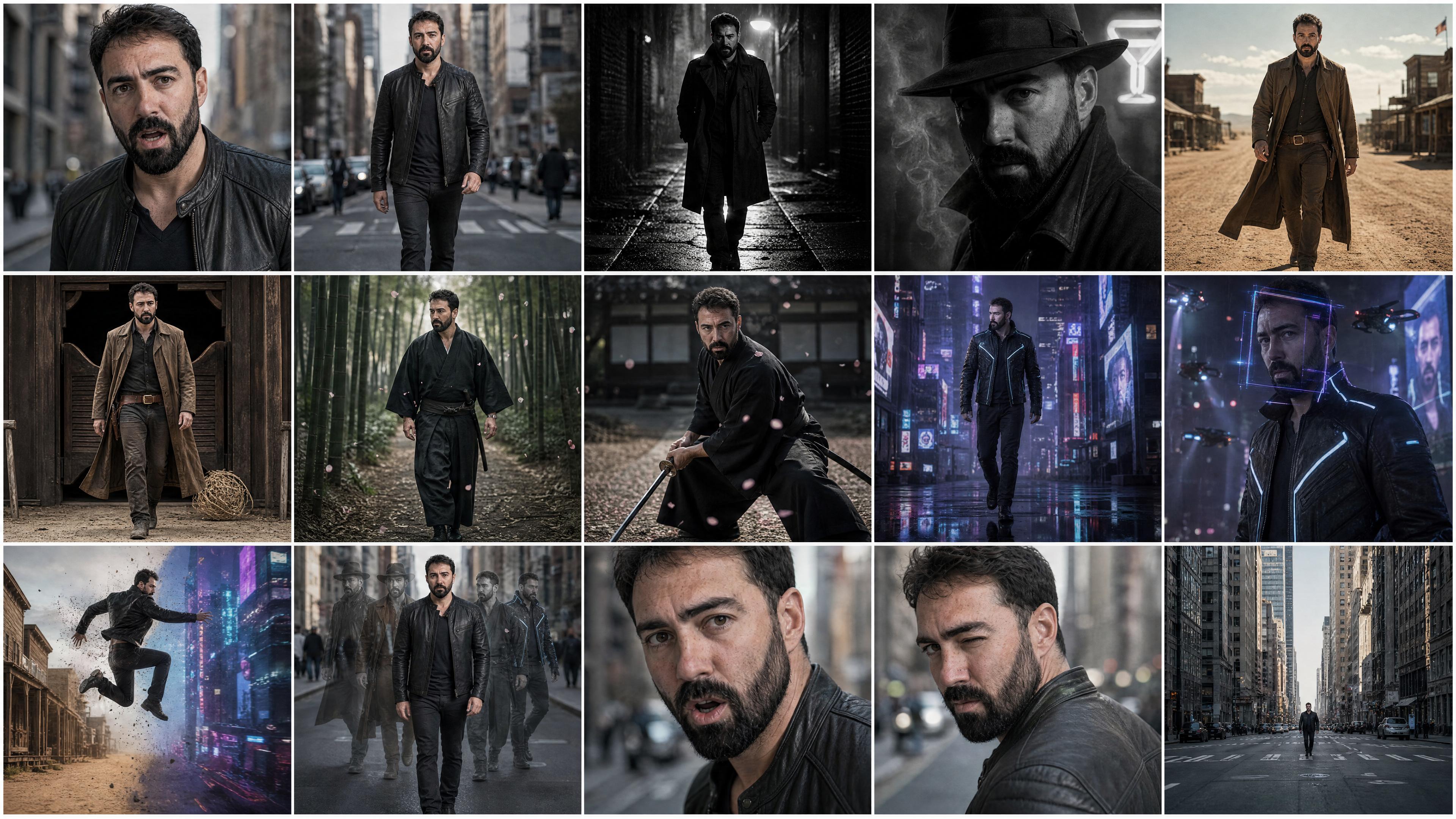
Every spoken line is a close-up. The chaos lives between the talking beats, never during them. That matched our measured data exactly: close-up staging reproduces the audio reference, action staging recomposes it. Stage every line as a close-up and Seedance 2.5 carries your voice natively. Our final video contains zero lipsync because none was needed.
The storyboard is one image. A single 15-panel grid, generated at 4K, fed as one reference. Seedance reads it as visual beats to connect into a continuous take, not as frames to copy. This matters double on the API, where the reference pool is 5 materials per run: one sheet spends one slot and buys the entire film's structure. Keep all text out of the panels; AI models still can't render text reliably, and lettering comes back garbled. We A/B tested the sheet generator inside the same board, one wire swap, and GPT Image 2 beat nano banana for a grid this complex: tighter likeness across panels, better cinematography, and it invented a transition we kept.
The last piece: record your audio before a single image exists. Real phone recordings, outside, projected like you're bragging to a friend twenty feet away, three takes per line. Then build the shot list around the recordings, each talking beat sized to its take. Audio first is not a slogan; it's the build order.
We rebuilt from scratch this way: one continuous take through five film genres, both talk beats staged as close-ups with my recordings bound to them. First generation: both lines landed word-perfect at the scripted beats, in my voice, worldized by the model into the scene.
The full Seedance 2.5 voice workflow
End to end, in one Wireflow board:
- Record your lines first. Phone, outside, energy up, three takes each. These become the audio references, and everything else is designed around their length and rhythm.
- Write a timestamp-scripted prompt with an audio direction per time slice. Sound gets directed like the camera: "his voice close and clean, ambience falls away" on the talking beats, dialogue in braces bound to the references.
- Generate the sheets: a character turnaround, a wardrobe strip if your concept changes outfits, and the 15-panel storyboard grid. No text in any panel.
- One Seedance 2.5 run with five references: storyboard, turnaround, wardrobe, and the two recordings, each bound to a close-up talking beat.
- Finish in post: color grade, captions cut to the measured word timings, title cards, watermark, a music bed under the native audio. Text always lives in post, where it's pixel perfect, never in the generation.
That last step is half the video. A raw AI clip doesn't look professional; the captions, cards, grade, and mix are what sell it. Doing them as nodes on the same canvas as the model means any stage re-runs in isolation, and everything upstream stays cached.
Quick answers
Does Seedance 2.5 clone your voice? No. Audio references guide tone, timbre, and pacing; the model regenerates a new voice. In close-up, low-action staging the reproduction is near-verbatim, which is the closest you can get to your real voice natively.
Do you need a lipsync model with Seedance 2.5? Not if you stage every spoken line as a close-up with an audio reference bound to it. The model generates matching lips and voice together. Lipsync passes are for repairing footage you can't regenerate.
How many references does Seedance 2.5 take? Up to 5 materials per run on the API. A storyboard grid image is the highest-leverage slot: 15 shots of structure for one material.
Why does my AI video voiceover sound dubbed? Because it is. A separately recorded voice never shares the scene's acoustic space, and a clone adds a second identity mismatch on top. Stage the voice into the generation instead.
Can Seedance 2.5 render text on screen? No, and neither can other video models, reliably. Keep titles, captions, and watermarks out of the generation and add them in post.
What I'd tell you before you start
- Budget throwaway generations for mapping model behavior. The positional audio-reference rule alone cost three runs to find.
- Verify what a run actually consumed, not what you saved. Cached upstream outputs are the silent killer of "why does it still say the old thing."
- If your video is cheap to generate, reroll instead of repairing. If it's expensive, stage it so there's nothing to repair.
- The best lipsync pass is the one you don't run. We mean that literally: the final video contains none.
The workflow with every node wired is public: STYLE SWAP on Wireflow. Fork it, drop in your own recordings, and it's your film.

Michael Aubry
Co-Founder & Lead Engineer at Wireflow
Builds the AI workflow engine behind Wireflow. Specializes in video and image generation pipelines, model integration, and rendering infrastructure.
- AI Workflow Architecture
- Full-Stack Engineering
Make AI videos and ads.
Start free, no card needed.