Kling AI Prompts: 8 Tested on Kling 3.0 Pro With Clips, Cost and Time

In this article▾
- Results at a glance
- How we ran the test
- The Kling prompt structure we used
- Prompts 1 and 2: a full prompt vs four words
- Prompts 3 and 4: speaker labels for dialogue
- Prompt 5: shot labels in one clip
- Prompt 6: quoted text in the frame
- Prompts 7 and 8: overloaded prompts
- Kling prompt patterns that failed, and the fix
- A Kling AI prompt template you can copy
- Cost and time from the run record
- Conclusion
- FAQ
We ran 8 Kling AI prompts through Kling 3.0 Pro on 21 October 2026, one 5-second run each: six did what they were written to test and two only partly did. Below is every prompt word for word, the clip it made, its cost and run time, and the patterns that broke. We ran the test on Wireflow, the node-based AI canvas we make, with each prompt wired to its own Kling Video node.
The top-ranking guides, from VEED, Dreamina and Pixelbin, teach a prompt formula, but none shows a clip with its cost and run time. We tested their claims, plus the speaker and shot labels from fal's Kling 3.0 guide, as plain text to video prompts with no start frame.
Results at a glance
| # | Prompt pattern | Result |
|---|---|---|
| 1 | Full formula, 58 words | Worked |
| 2 | Four words | Worked, but Kling chose the look |
| 3 | One labeled speaker | Worked, line rushed |
| 4 | Two labeled speakers | Worked |
| 5 | Two labeled shots | Worked: one cut at 3.0 s |
| 6 | Quoted window text | Partly: 4 of 7 words right |
| 7 | Twelve listed scene items | Worked: 12 of 12 on screen |
| 8 | Four actions in 5 seconds | Partly: the spin was skipped |
Build this in Wireflow
Make the same kind of asset on a canvas you control, with a free account and no credit card.
How we ran the test
Each prompt fed a Kling Video node set to Kling 3.0 Pro, 5 seconds, 16:9, sound on, with the node's default negative prompt ("blur, distort, and low quality"). All eight ran once, at the same time, with no retries, a setup node-based video generation makes easy. Each clip came back at 1920x1080 and 24 fps.

We judged each clip from its frames, a speech-to-text pass and scene detection for cuts. Click any frame grid below to watch its clip. One run per prompt is a small sample, and the same prompts can be rerun from code through the Kling AI API.
The Kling prompt structure we used
VEED splits a Kling prompt into subject, action, context and style; Picsart puts the camera move first; fal adds labels for speakers and shots. We used this order, which suits most models in an AI video generator:
- Camera: "Slow dolly-in at eye level".
- Subject: age, look, one clothing detail.
- Action: two or three steps with an end point.
- Scene, light and style.
- Dialogue:
[Character A: description], then[Label, tone]: "line". - Audio: its own sentence after "Audio:".
Prompts 1 and 2: a full prompt vs four words
Prompt 1: the full formula
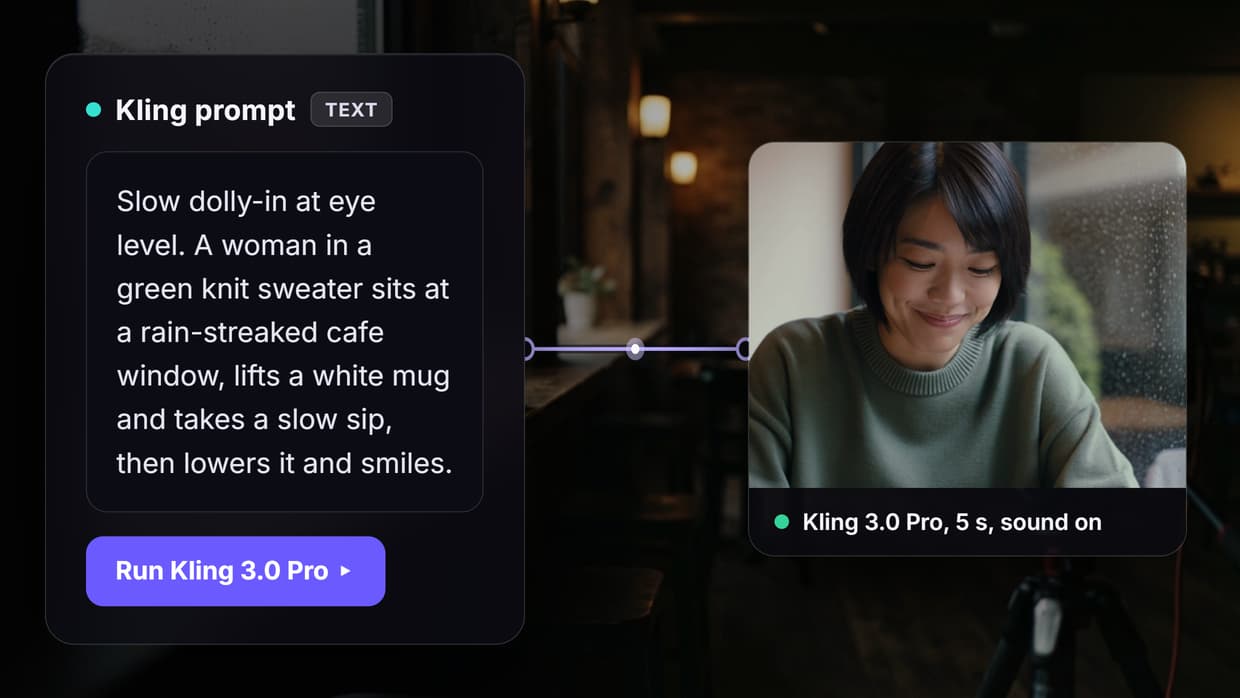
Slow dolly-in at eye level. A woman in her thirties with short black hair and a green knit sweater sits at a rain-streaked cafe window, lifts a white mug and takes a slow sip, then lowers it and smiles. Soft window light, shallow depth of field, warm muted colors. Audio: rain on the glass and quiet cafe chatter.
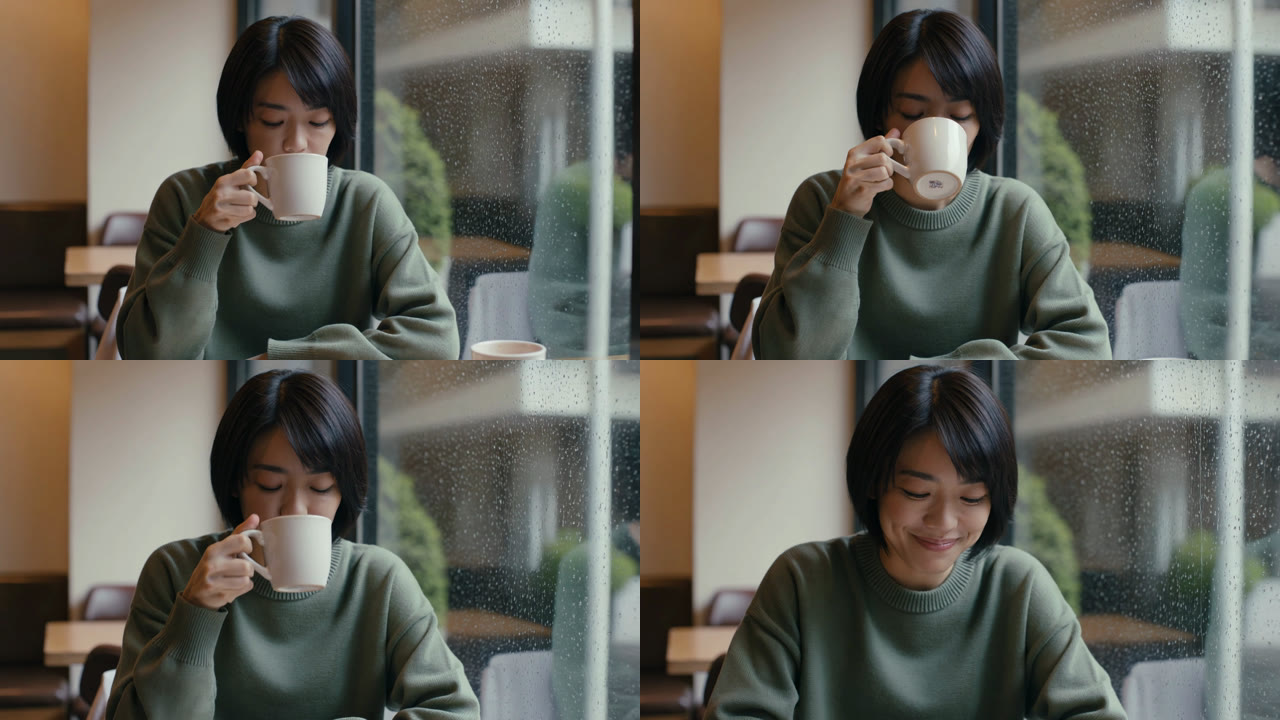
Every part landed. The camera pushed in until her face was about 1.5 times wider than at the start, and she sipped, lowered the mug and smiled with rain running down the glass. Kling added a second cup we did not ask for. For the model itself, see our Kling Video 3 page.
The sound was faint: this clip averaged -48 dB, against -20 to -30 dB for prompts 3 to 8. Ask for ambience plainly, or lay a track under the clip as in our guide to AI soundtracks.
Prompt 2: four words
A woman drinks coffee.
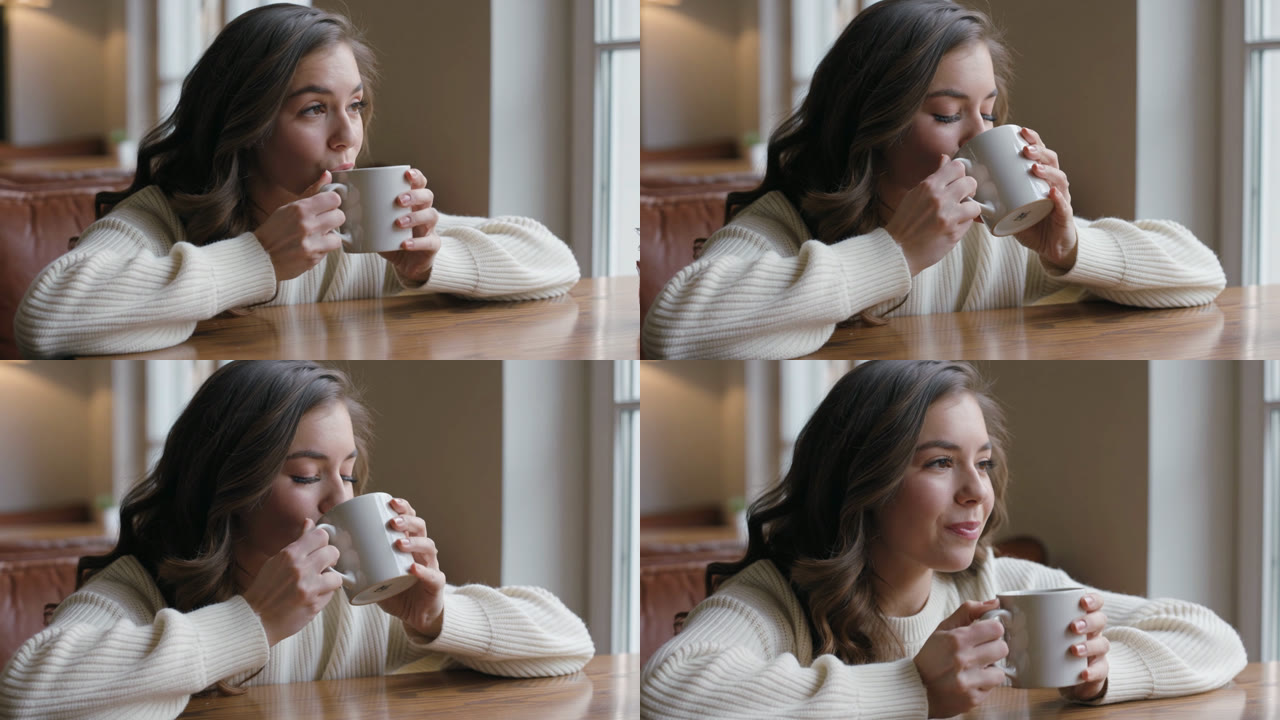
Picsart uses this exact line as its basic example, and VEED says prompts under 30 words are usually too vague. Kling 3.0 Pro still made a clean clip: a young woman in a cream sweater at a window table, sipping and smiling, with a slight camera drift rather than a static frame. That is the trade-off when turning text into video with a short prompt: nothing fails, but the model makes every choice.
It looks a lot like prompt 1, and the audio was near silent (-52.5 dB); the prompt asked for no sound. When the look must match a brief, as in a product video, write the age, clothing, setting and light yourself.
Prompts 3 and 4: speaker labels for dialogue
Prompt 3: one labeled speaker
Medium close-up on a wooden fishing dock at dawn. [Character A: a fisherman in his sixties with a grey beard and a yellow oilskin jacket] coils a rope, then looks up at the camera. [Fisherman, gravelly, calm voice]: "The tide turns in an hour, so we leave now." Audio: gulls and water lapping against the dock.
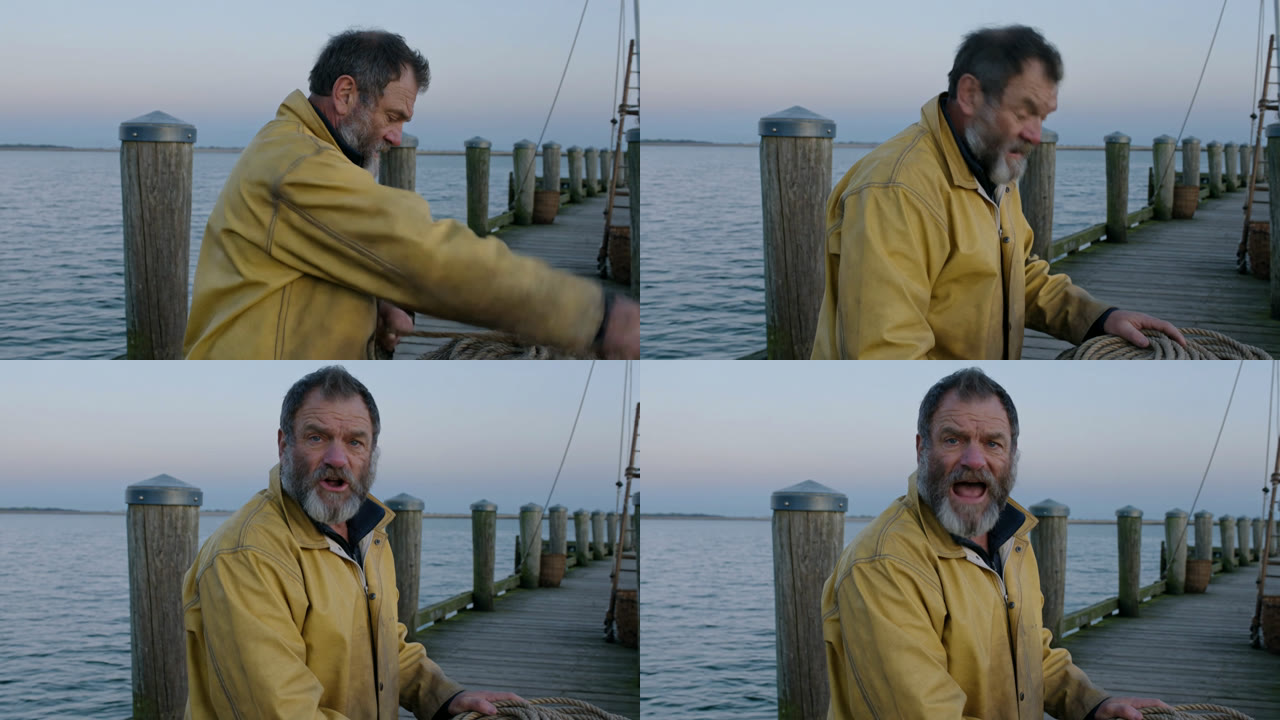
He coiled the rope, looked up at about 2.1 seconds and said the line word for word from 2.28 to 4.78 seconds: 10 words in 2.5 seconds, about 4 words a second, with a face that read as urgent rather than calm. In our Veo 3 prompts test, a dialogue line ran at 1.9 words a second.
With an action first, a 5-second clip leaves about 2.5 seconds for speech. We would keep lines to about 8 words, or set the node to 10 seconds. For longer scripts, record the voice and use a lip sync generator.
Prompt 4: two labeled speakers
Medium two-shot in a busy restaurant kitchen. [Character A: a head chef, a tall man in his fifties in a white chef's hat] [Character B: a young woman line cook in a red bandana]. The head chef points at a plate. [Head chef, firm, low voice]: "Table six wants it with no onions." Immediately, [Line cook, quick, bright voice]: "Already done, chef." Audio: sizzling pans and clattering plates.
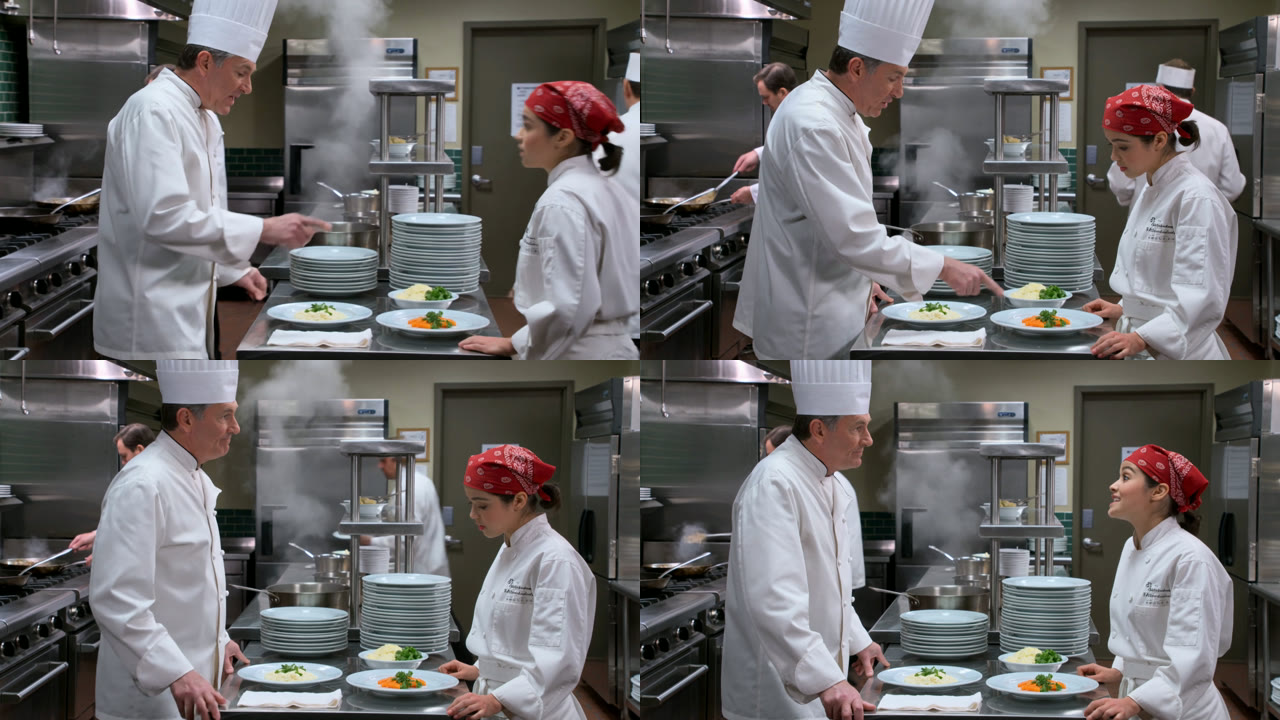
Both lines came out word for word on the right faces: the chef from 0.00 to 2.64 seconds while pointing at the plate, the cook from 3.92 to 4.86 seconds. Morphic's guide warns that without labels Kling can put a voice on the wrong face. With them, this worked first time, a useful pattern for two-person UGC-style video.
Prompt 5: shot labels in one clip
Shot 1, wide: a red vintage convertible drives along a coastal cliff road at sunset. Shot 2, close-up: the driver's hands in brown leather gloves turn the wooden steering wheel. Audio: engine hum and waves below.
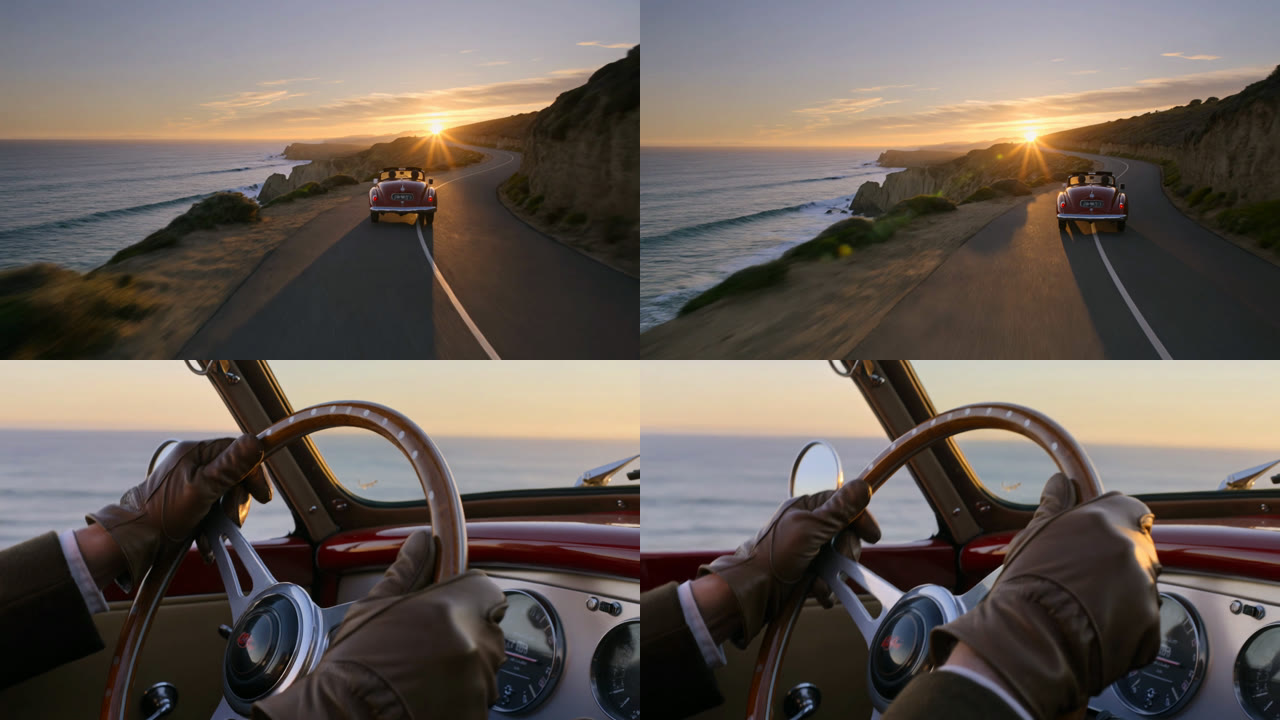
Kling cut exactly once, at 3.0 seconds, from the wide shot to the gloved hands on a wooden wheel. Timestamped shots on Veo 3.1 gave us one continuous take, so here the two models differed. For how Kling 3.0 compares overall, see our Kling 3.0 review.
fal says Kling 3.0 can make up to six shots in one output. Beyond two, we would still make one clip per shot and join them with multi-shot video stitching, so each shot can be rerun alone.
Prompt 6: quoted text in the frame
Static shot of a small bookshop window at dusk, warm light inside. Gold lettering on the glass reads "Marlow & Finch Books" and a handwritten paper sign in the corner reads "Open until 9". A grey cat walks along the window ledge. Audio: light street noise.
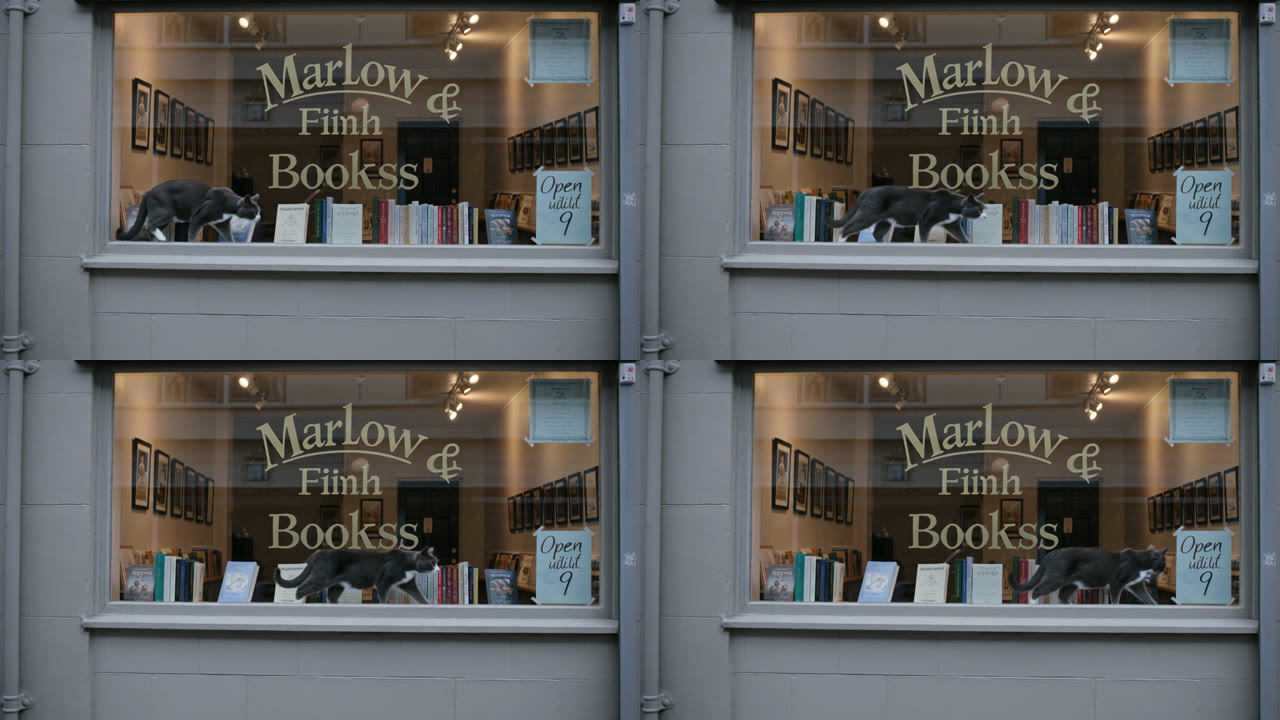
The text was half right. "Marlow", "&", "Open" and "9" rendered cleanly, but "Finch" became "Fiinh", "Books" became "Bookss" and "until" was a scribble: 4 of 7 words, misspelled the same way in every frame. For exact text, make the window as a still with an AI image generator, check the spelling, then wire it into the node's Start Frame input.
Prompts 7 and 8: overloaded prompts
Prompt 7: twelve scene items
A busy street market at noon: a fruit stall piled with oranges, a man juggling three apples, a dog asleep under a table, a girl holding a red balloon, a cyclist ringing a bell, striped awnings, paper lanterns, a violinist playing, pigeons on the cobblestones, a woman carrying a basket of bread, a clock tower in the background and steam rising from a food cart. Handheld tracking shot. Audio: market chatter and violin music.
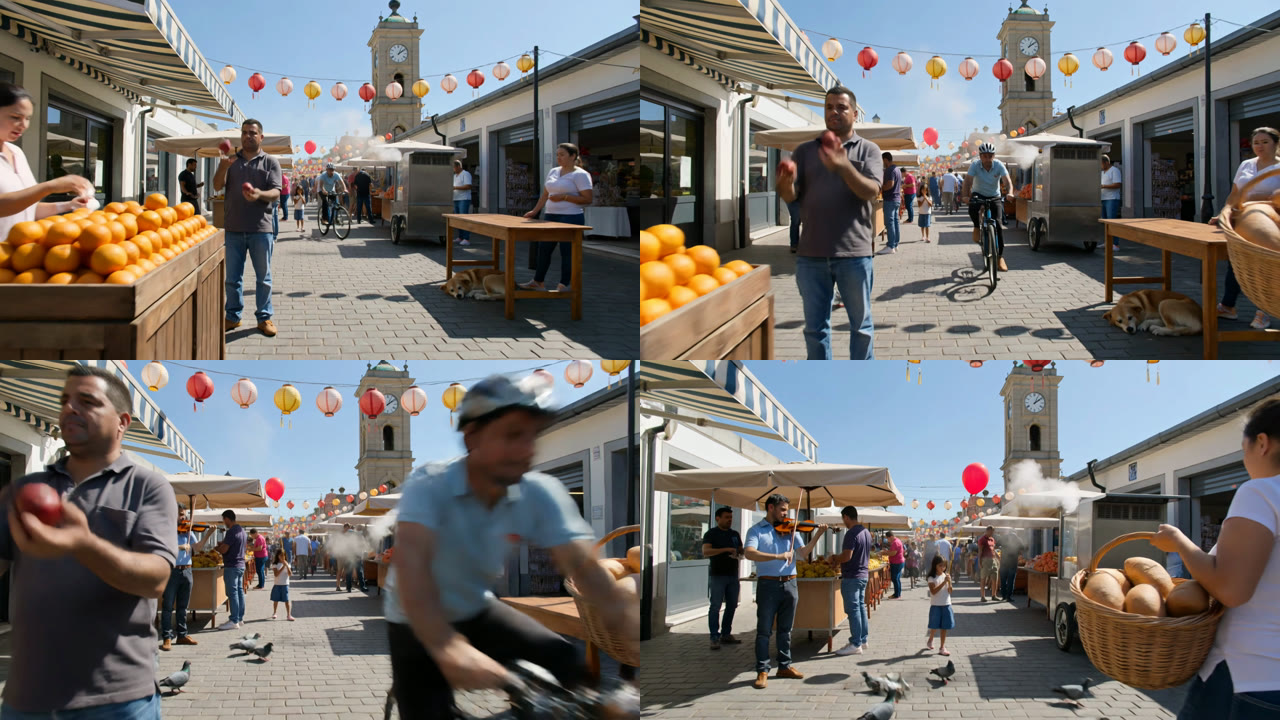
VEED says to keep context to 3 to 5 elements and puts Kling 2.6 at 5 to 7. Kling 3.0 Pro put all 12 items on screen in 5 seconds. The one miss was a number: the juggler tossed two apples, not three, so check counts in any AI video workflow that depends on them.
The catch is screen time: the moving camera only reaches the violinist in the last 2 seconds. If each element must be seen properly, split the scene into shots inside an AI video pipeline.
Prompt 8: four actions in five seconds
Side tracking shot on an outdoor basketball court in the afternoon. A player in a blue jersey dribbles twice, spins to his left, jumps and dunks the ball, then lands and points at the camera. Audio: the ball bouncing, sneakers squeaking and the rim rattling.
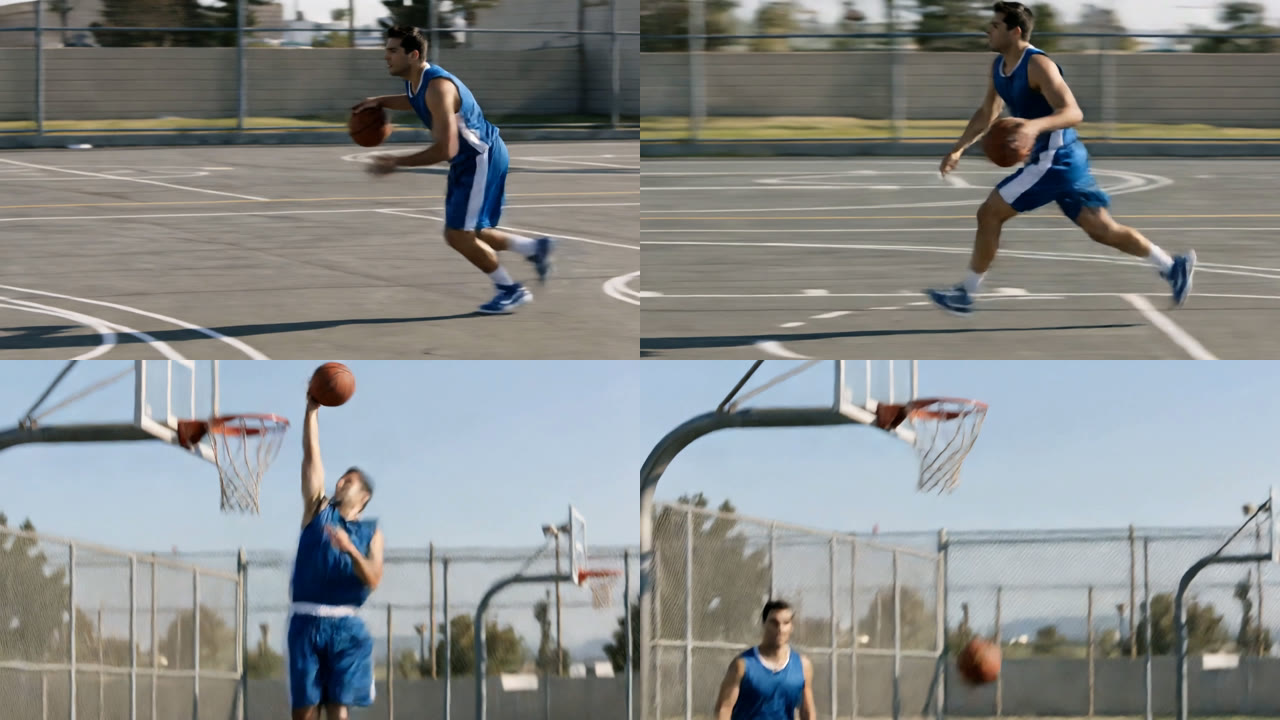
VEED warns that more than 3 sequential actions overloads a clip. Kling kept three of our four: the player dribbled, dunked (through the net at about 3.4 seconds), then landed and pointed at the camera. The spin never happened. Our guide to generate Kling videos through the API covers batching shorter clips instead.
The camera also tracked from the side for about 2.6 seconds, then swung round to face the hoop without a cut. For action, give each beat its own clip, or start from a still through image to video so the model only adds motion.
Kling prompt patterns that failed, and the fix
| Pattern | What went wrong | Fix |
|---|---|---|
| Quoted shop-window text | 3 of 7 words misspelled | Make the text as a still, use it as the start frame |
| Four actions in 5 seconds | The spin was skipped | Two or three actions per 5-second clip |
| 10-word line after an action | Rushed at about 4 words a second | About 8 words, or a 10-second clip |
| Four-word prompt | Kling chose the person and setting | Name age, clothing, setting and light |
| Quiet ambience request | Very low audio level | Ask for the sound plainly, or add audio later |
Most misses came from packing too much into 5 seconds, not from prompt length: the 74-word market worked while the 45-word basketball prompt dropped an action. When a pattern keeps failing, run the prompt on other models to compare AI video models side by side.
A Kling AI prompt template you can copy
[Camera move] at [angle]. [Character A: age, look, one clothing detail] [action one], then [action two] in [setting, time of day]. [Light, lens, color]. [Label, tone]: "[line of about 8 words for 5 seconds]" Audio: [ambience], [one sound tied to the action].
For two shots: Shot 1, [framing]: [what happens]. Shot 2, [framing]: [what happens].
An assistant can draft ten variations of one shot from this template in seconds, as our guide to Claude video generation shows.
Cost and time from the run record
| Prompt | Time | Credits |
|---|---|---|
| 1. Full formula | 94 s | 135 |
| 2. Four words | 155 s | 135 |
| 3. One speaker | 113 s | 135 |
| 4. Two speakers | 138 s | 135 |
| 5. Shot labels | 168 s | 135 |
| 6. Quoted text | 149 s | 135 |
| 7. Twelve items | 178 s | 135 |
| 8. Four actions | 148 s | 135 |
| Grid (Video Editor) | 81 s | 0 |
| Total | 3 min 6 s for all eight, in parallel | 1,080 |
Each 5-second Kling 3.0 Pro clip with sound cost 135 credits, matching the quote before the run. On the Professional plan ($59 a month for 4,370 credits, as listed on 21 October 2026) that is about $1.82 a clip and $14.58 for the test. Current plans are on the credit plans page.
Kling's own app sells credits on separate plans, covered in our Kling AI pricing breakdown.
Conclusion
The Kling AI prompts that worked gave the model one camera move, one subject and two or three actions, with speakers and shots labeled. The ones that broke asked 5 seconds to spell a shop name or fit four moves. Start from the template, keep exact text out of the prompt, and if Kling still misses, our list of Kling AI alternatives covers other models to try.
Try it yourself: Open this Kling prompt test workflow in Wireflow. All eight prompt nodes, Kling 3.0 Pro nodes and the grid are set up exactly as in this test; edit a prompt and run its node.
FAQ
What is the best prompt structure for Kling AI?
Camera move, subject, two or three actions, setting and light, labeled dialogue, then audio as its own sentence. Our 58-word prompt built this way matched on every point, and the order works for most video generation API tools.
How long should a Kling AI prompt be?
Ours ran from 4 to 74 words, and length did not decide the result; actions per second did. A programmatic video generation platform can template the parts that stay fixed.
How do I make characters talk in Kling 3.0?
Define each character in brackets, then write [Label, tone]: "line". Both our dialogue tests said every word on the right face. For longer lines, a lip sync API on a recorded voice gives more control.
Can Kling AI make several shots in one clip?
Yes. "Shot 1, wide:" and "Shot 2, close-up:" gave one clean cut at 3.0 seconds. For longer stories, an AI storyboard generator helps plan one clip per shot.
Can Kling AI put readable text in a video?
Partly: 4 of 7 quoted words were right in our test. For exact text, make a still first and animate it with an image to video API.
Does Kling AI support negative prompts?
Yes. The Kling Video node's Negative Prompt input defaults to "blur, distort, and low quality", and we left it there, so this run did not test other values. Our Kling AI vs Veo 3 post runs the same prompts through both models.
How much does it cost to run a Kling AI prompt?
135 credits per 5-second Kling 3.0 Pro clip with sound, about $1.82 on the Professional plan. The node bills per second of video, a form of usage-based AI API pricing.

Co-Founder & Operations at Wireflow
Runs client operations and content strategy at Wireflow. Works directly with creative teams and agencies to build production AI workflows.
- Content Strategy
- Client Operations
Make AI videos and ads.
Start free, no card needed.