Higgsfield Miracle: What It Is, How to Get Access, and What to Use Today

In this article▾
Higgsfield Miracle is a video editing tool, announced on 6 November 2026, that splits a clip into layers so you can change one object while it plays. It is in private beta with a waitlist, and Higgsfield has published no price, release date or file limits yet. We read everything Higgsfield has said about it, then ran the same kind of edit today on Wireflow, the node-based AI canvas we build. We compete with Higgsfield, so read this as a competitor's guide.
You can join the Miracle waitlist now, but nobody outside the beta can run it yet, while the same kind of edit already runs from Claude through Wireflow MCP. Our one-object recolor on Wireflow cost 128 credits, about $1.73, and took 16 minutes, and the pixels away from the edited coat came through from the original almost exactly. For moving more of your agent work off Higgsfield, see our page on a Higgsfield alternative for agent workflows.
What Higgsfield Miracle is
Higgsfield's announcement on X calls Miracle "our latest proprietary post-production technology" that "vectorizes any video into layers for localized, pixel-level editing in real time, with world knowledge built in." It adds that "every frame holds the image depth needed for cinema-grade post-production." The post had about 556,000 views on 7 November 2026.
Here is what each part means in plain words, as we read it.
- Layers: the clip is split into separate pieces, such as a person, their coat, the sky and a sign, and each piece is tracked from frame to frame.
- Localized, pixel-level editing: an edit changes the pixels of the piece you point at and leaves the rest of the frame alone.
- Image depth: each frame also carries how far every part of the picture is from the camera, which is what relighting and compositing need to look right.
- Real time: the change shows up while the clip plays, with no render queue.
- World knowledge: Higgsfield's phrase. It has not said what model is behind it or how it works.
Higgsfield's FAQ says Miracle is not a new video generation model. It is "built to edit an existing clip", and the idea is "to keep the take you picked and change only what you ask for." That is a different job from generation, and closer to what Genjutsu's Object Swap does with a reference image.
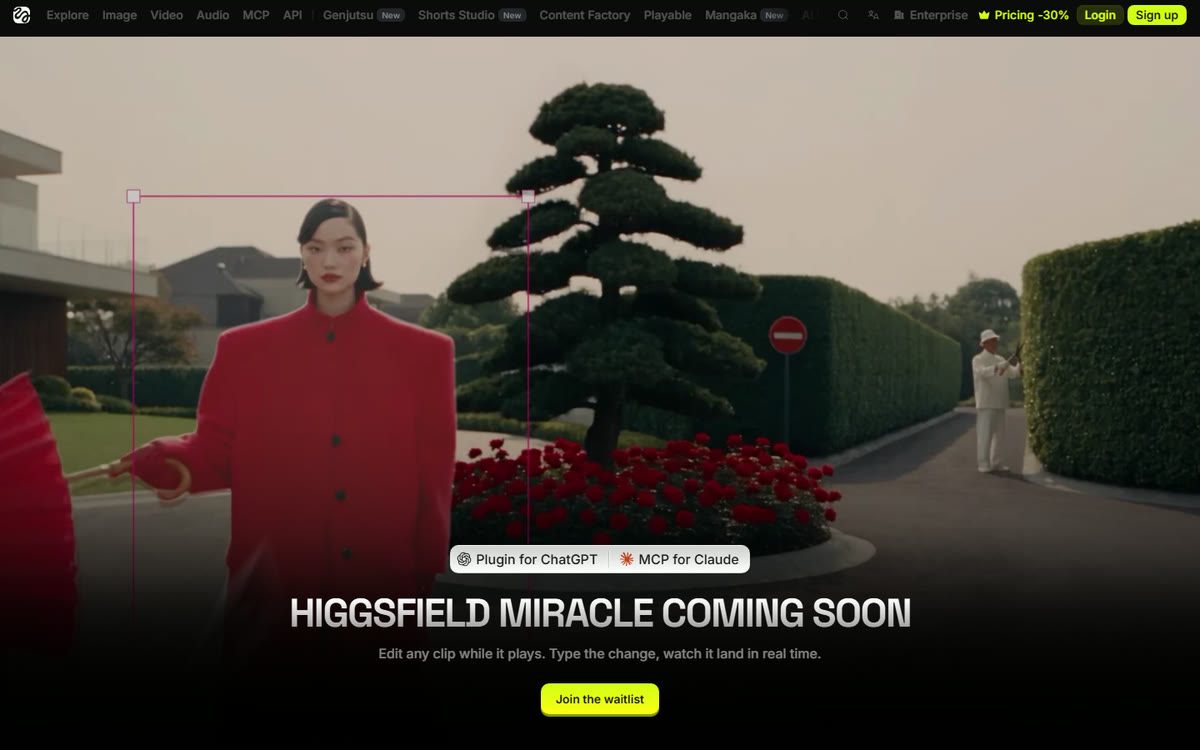
The edits Higgsfield shows
The Miracle page shows these edits, quoted where we use its words.
- Recolor one object by typing a hex code, so "only that object takes it".
- Move or remove one thing in the shot.
- Change "the coat, the sky or the sign" while "face, light and camera stay exactly as shot".
- Shift the time of day, the sun or the mood, with shadows that follow.
- Make fur, hair or fabric softer, longer or fuller "on one slider".
- Add live text that "holds frame to frame".
- Pull any layer out and "put it back with no seams".
Its FAQ says the tools in progress are "recolor, remove and add, on-screen text, background swaps and grading", and that "the final set of tools will be confirmed at launch."
Build this in Wireflow
Make the same kind of asset on a canvas you control, with a free account and no credit card.
What Higgsfield has not published yet
Every row below comes from the Miracle page and the announcement, read on 7 November 2026. Where Higgsfield has not said something, this page does not guess.
| Question | What Higgsfield says |
|---|---|
| Price | Not published. Plans and credits for its other tools are in our Higgsfield AI pricing guide |
| Release date | "Coming soon", no date |
| How fast is real time | "We'll share exact performance numbers when Miracle launches" |
| Your own footage | "That's the plan" |
| Formats and limits | "Supported formats and limits will be announced with the release" |
| How well edits hold | "We'll publish how well it holds up once testing is complete" |
| Who can use it now | "Private beta with select testers" (X) and "early testing with selected partners" (page) |
How to get access to Higgsfield Miracle
The waitlist on Higgsfield's Miracle page is the only way in. The page says to "leave your email and we'll write when your seat is ready", and the announcement says Miracle is "coming soon to Higgsfield MCP". Higgsfield has not said when Miracle reaches it, or what it will cost per clip, and our list of Higgsfield MCP alternatives compares the connectors you can use now.
For this kind of edit in Claude today, you can use Wireflow's own connector instead, as our Claude Connector docs describe, and the coat recolor from our run below is a workflow you can run from Claude straight away. The setup steps are in the section on running it from Claude.
The same kind of edit, run on Wireflow today
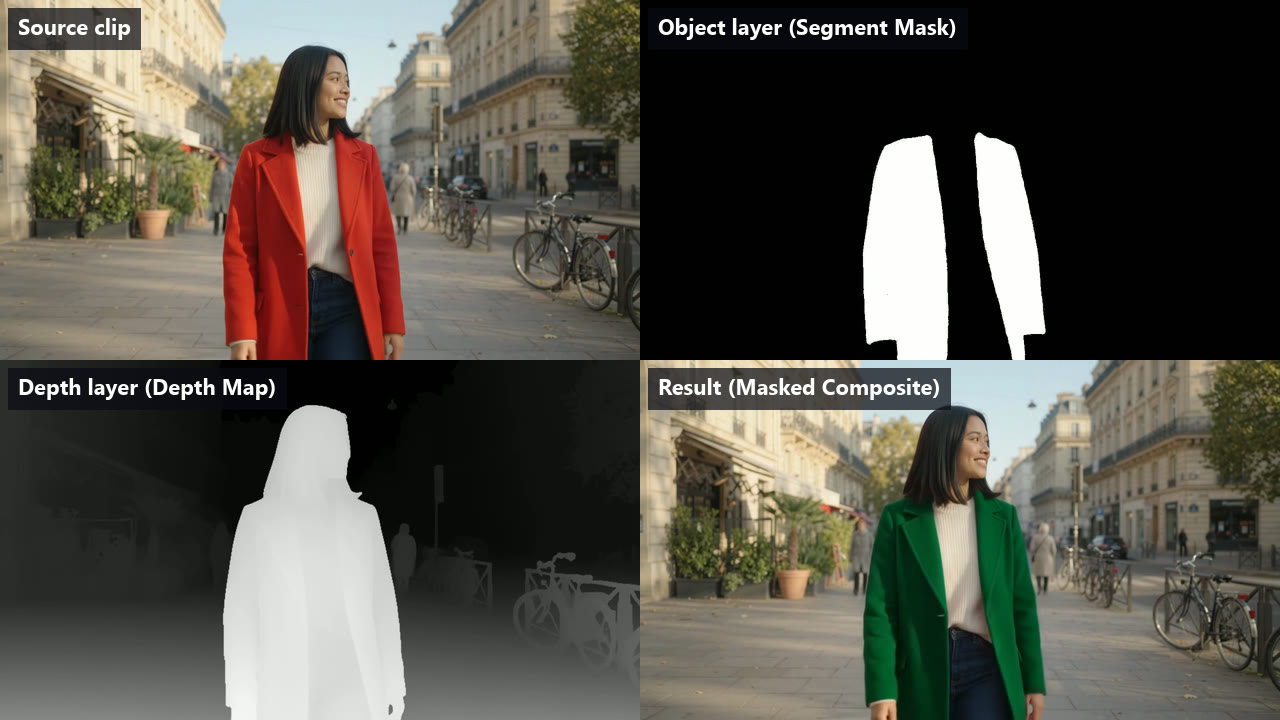
Miracle is not open, but the job it describes, changing one object in a clip you already have and keeping everything else, can be built today from nodes that each do one part. We built it as one workflow with four working nodes, one for each layer of the job.
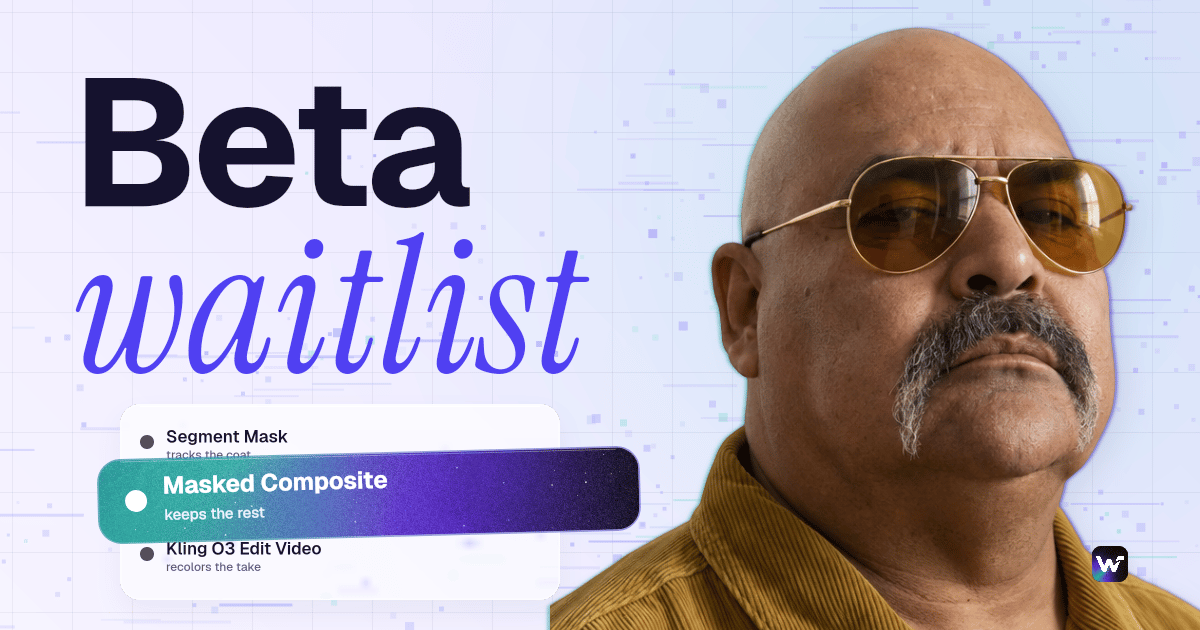
- Object layer: the Segment Mask node tracks "red coat" through every frame with Meta SAM 3 and returns a black and white mask video.
- Depth layer: Depth Map (Video) turns each frame into a depth map with Video Depth Anything.
- The edit: Kling O3 Edit Video rewrites the clip from a prompt while the shot, motion and length stay as filmed.
- The lock: the Masked Composite node takes only the coat from the edited take and passes every pixel outside the mask through from the source.
The source was a 5 second, 720p clip of a woman in a red coat walking down a sunny street, made in Wireflow with Gemini Omni Flash 1.2 for 70 credits. The object prompt was "red coat". This is the exact edit prompt, with the clip wired in as @Video1.
Change the color of the red coat in @Video1 to deep forest green (#1F5C46). Keep the coat's cut, length, collar, folds and wool texture. Keep her face, hair, cream sweater, jeans and hands, the street, the bicycles, the people in the background, the sky, the camera motion and the lighting exactly as in the original clip.
| Node | What it made | Credits | Time |
|---|---|---|---|
| Segment Mask | Black and white mask of the coat, 120 frames | 1 | 17 s |
| Depth Map (Video) | Grayscale depth video, 120 frames | 25 | 31 s |
| Kling O3 Edit Video | Recolored take, 5 s, 1280x720, 24 fps, sound kept | 102 | 15.4 min |
| Masked Composite | Final clip, 5 s, sound copied from the source | 0 | 16 s |
| Whole run | Four outputs | 128 | 16.1 min |
On 7 November 2026 the current plan prices put Starter at $36 for 2,660 credits. At that rate our 128 credits cost about $1.73, or $2.68 with the 70 credit source clip. The Kling node is most of the cost and almost all of the time. It showed as pending for most of its 15 minutes, while the same node took 2.4 and 4.6 minutes on our Genjutsu test in October.
Kling's raw take got the recolor right, but it also redrew the rest of the frame a little. We compared 12 frames, every tenth one, with the source, leaving out a 12 pixel band around the coat's edge. In the raw take, 7.1% of those pixels moved by more than 12 of 255 levels, mostly on her face, hair and sweater and in the trees and bicycles. After the Masked Composite, 0.003% did, with an average change of 1.4 levels. The node's docs say pixels outside the mask pass through untouched and only the final video encode sees them, so that small rest is the encode.
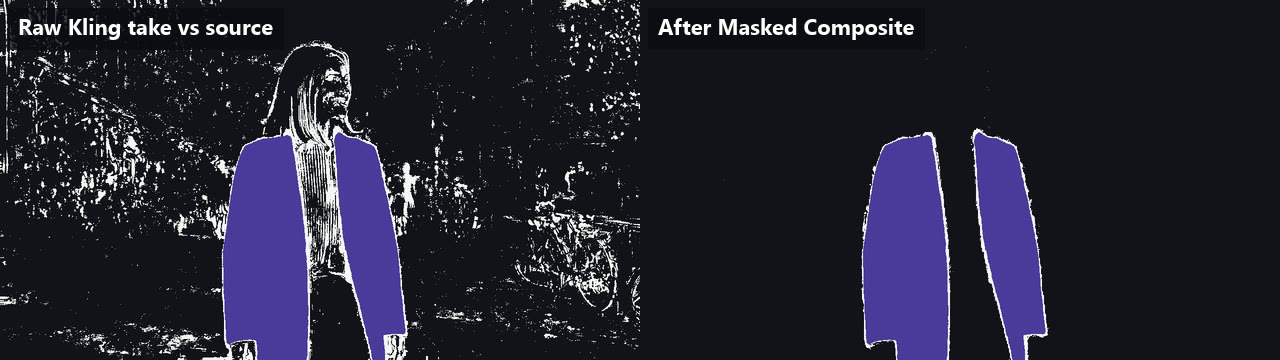
Two things are worth knowing before you rerun it with your own clip.
- A hex code is a guide, not a guarantee. We asked for #1F5C46 and the coat came out a deeper, more saturated green, about #074121 on average. Higgsfield's "type a hex, only that object takes it" is a promise this setup does not make.
- Leave "Largest region only" off for objects split in two. Our first composite had it on. The sweater splits the coat's mask into two pieces, so only one panel turned green. With it off, rerunning just that node took 29 seconds and 0 credits.
Try it yourself. Open this workflow in Wireflow. Upload your clip, type the object and the change, and run it. You can open and change this workflow for free, and new accounts get a free video.
Run it from Claude with the Wireflow MCP
Miracle is not in Claude yet. The coat recolor from our run is a workflow you can run from Claude today, through the Wireflow MCP connector, in three steps.
- In claude.ai or Claude Desktop, open Settings, then Connectors, choose Add custom connector and enter
https://www.wireflow.ai/api/mcp, then sign in to Wireflow on the consent screen. No API key is needed. In Claude Code, runclaude mcp add --transport http wireflow https://www.wireflow.ai/api/mcp, then/mcpto sign in. - Ask Claude to run the published app
recolor-one-object-in-a-video-keep-every-other-pix-cmw5l3udn0with your clip, the object to change and the edit you want. Therun_apptool starts it on your credits, andget_executionreturns the output links. - If Claude cannot attach the video itself, its
create_upload_linktool gives you a phone-friendly link that puts the file on your board.
Wireflow's pricing page lists MCP access on every plan, Free included, and every run still spends credits from your balance.
Higgsfield Miracle and a node workflow, side by side
Higgsfield's column comes from its own pages on 7 November 2026. Wireflow's column comes from our run and the live node list. For other models that edit existing footage, see our list of AI video editing APIs.
| Higgsfield Miracle | Wireflow workflow above | |
|---|---|---|
| Can you use it today | Private beta, waitlist | Yes |
| How the edit shows up | "While the clip plays", no render queue | After a render, 16 minutes on our run |
| How you pick the object | "Type the change"; its demo puts a selection box on the object | Name it in a text box, Segment Mask tracks it |
| What stays untouched | "Face, light and camera stay exactly as shot" | Every pixel outside the mask is copied from the source |
| Edit types named | Recolor, remove and add, text, background swaps, grading | Anything Kling O3 Edit Video can do from a prompt, kept to one region |
| Depth per frame | "Every frame holds the image depth" | A separate Depth Map (Video) layer |
| Clip limits | "Announced with the release" | 3 to 15 seconds for Kling O3 Edit Video, at least 720 px a side |
| Price | Not published | 128 credits for our 5 second, 720p run |
| From Claude | "Coming soon to Higgsfield MCP" | Wireflow MCP today |
FAQ
What is Higgsfield Miracle?
Higgsfield's new post-production tool. It splits a video into layers so one object can be edited in real time while the rest of the shot stays as filmed. It edits existing clips and does not generate new ones.
Is Higgsfield Miracle available yet?
Not publicly. On 7 November 2026 it was in private beta with select testers, and the page shows a waitlist and "coming soon".
How do I get access to Higgsfield Miracle?
The waitlist on Higgsfield's Miracle page is the only way in. For this kind of edit today, connect Wireflow MCP at https://www.wireflow.ai/api/mcp and run the coat recolor workflow from this page from Claude.
How much does Higgsfield Miracle cost?
Higgsfield had not published a price for Miracle on 7 November 2026, on the Miracle page or in the announcement.
Does Higgsfield Miracle work in Claude?
Not yet. Higgsfield says it is "coming soon to Higgsfield MCP" and gives no date, so the way to run this kind of edit from Claude now is Wireflow MCP.
Can I change one object in a video without changing the rest today?
Yes, if you add a mask step. Track the object with Segment Mask, edit the clip with a model such as Kling O3 Edit Video, then let Masked Composite take only the masked region from the edit. It is not real time, but the pixels outside the mask come from your original.
Is Wireflow free?
You can open and change this workflow for free, and new accounts get a free video. More videos need a plan, from $36 a month for 2,660 credits.
Conclusion
Higgsfield Miracle promises real-time, one-object edits on footage you already shot, and its page and announcement are clear that the details come at launch. Until then, the waitlist is the only way in. If you need the edit this week, Wireflow runs it now as a node graph you can rerun from the canvas or from Claude through Wireflow MCP, at 128 credits for our 5 second test.

Co-Founder & Operations at Wireflow
Runs client operations and content strategy at Wireflow. Works directly with creative teams and agencies to build production AI workflows.
- Content Strategy
- Client Operations
Ask Claude for your next ad.
Connect once. Ask any time.
- No credit card
- You keep the rights to what you make
- Cancel anytime
More in Guides
Walkthroughs with the model and the settings that held up.