Topaz Upscale API: Run Topaz Image and Video Upscaling With One Key

In this article▾
The Topaz upscale API lets developers send photos and video to Topaz Labs' upscaling models from code instead of the desktop apps. This guide covers the official Topaz Image and Video APIs, what each call costs in credits, and how Wireflow runs Topaz image and video upscaling behind one API key, in batch, next to the other upscalers in its catalog.
Quick answer
| Question | Answer (checked 20 October 2026) |
|---|---|
| Is there an official Topaz API? | Yes. Topaz Labs sells an Image API and a Video API, documented at developer.topazlabs.com and keyed with an X-API-Key header |
| How is it billed? | In credits. One credit covers up to 24 MP of Gigapixel output, and Topaz's API page lists credits at $0.08 to $0.12 |
| Does it return the file at once? | No. Image jobs are submitted, polled and then downloaded. Video jobs take five calls, including an upload to signed URLs |
| Can one key run Topaz and other upscalers? | Yes, through a reseller or a workflow API. Our node catalog has four Topaz nodes, one for images and three for video, next to Crystal, Clarity and Magnific upscalers |
| How do results come back on a workflow API? | You poll an execution ID, or a signed webhook posts the result when the run finishes |
In short, you can call Topaz in three ways: straight from Topaz Labs, through a reseller's key, or as a node inside one workflow API over many models, where the same request can also run Crystal or Magnific on the same image. The rest of this guide covers each route, with code and a measured run.
Build this in Wireflow
Make the same kind of asset on a canvas you control, with a free account and no credit card.
What the Topaz API covers
Topaz sorts its API models into three types. Precision models keep the source as it is and add resolution. Generative models add detail and texture while keeping the original intent. Creative models add new detail and can change objects, identity and style. Which type you pick matters more than the scale factor, the same trade-off every AI image upscaler asks you to make.
| Family | Type | Image or video | Topaz price (video: per 10 s at 1080p, 30 fps) |
|---|---|---|---|
| Gigapixel | Precision | Image | 1 credit per 24 MP of output |
| Wonder | Generative | Image | 1 credit per 4 MP |
| Bloom | Creative | Image | 1 credit per 2 MP |
| Proteus | Precision | Video | 4 credits |
| Starlight | Generative | Video | 6 (Fast) or 12 (Quality) credits |
| Astra | Creative | Video | 40 credits |
The same docs also list Sharpen, Denoise, Removal and Cleanup, and Color and Lighting models, so jobs that restore damaged old photos can pair an upscale with a cleanup step.
On 20 October 2026, Topaz's API page listed Developer at $50 a month for 500 credits ($0.10 each) and Scale at $240 a month for 3,000 credits ($0.08 each), with a $0 Starter tier at $0.12 per credit marked "coming soon". The developer docs call it pay as you go, so confirm terms at signup. Billing follows the output size: a 2048 x 2048 Gigapixel result is about 4.2 MP, so one credit ($0.08 to $0.12), and a 10-second 1080p Proteus job is 4 credits ($0.32 to $0.48). Compare that with other usage-based AI API pricing before you budget.
Route 1: the official Topaz API
The first-party route takes three steps for images: create an API key in your Topaz account, submit the image, then poll until the job finishes and fetch a download URL. It is the same submit-and-poll pattern most image editing APIs use. Topaz's quickstart shows the calls in JavaScript and Python; here they are as curl:
# 1. Submit the image (multipart form)
curl -X POST https://api.topazlabs.com/image/v1/enhance/async \
  -H "X-API-Key: $TOPAZ_API_KEY" \
  -F "image=@strap.jpg" \
  -F "model=Standard V2" \
  -F "output_format=jpeg"
# returns { "process_id": "..." }

# 2. Poll until status is "Completed" ("Failed" and "Cancelled" are final too)
curl https://api.topazlabs.com/image/v1/status/PROCESS_ID \
  -H "X-API-Key: $TOPAZ_API_KEY"

# 3. Get the download URL
curl https://api.topazlabs.com/image/v1/download/PROCESS_ID \
  -H "X-API-Key: $TOPAZ_API_KEY"
In the quickstart the image goes up as a multipart file, and the result is a link you copy to your own storage. That is the usual shape of a hosted AI inference API, and it works well when Topaz is the only model you call.
Video takes five calls
POST /video/with asourceblock (resolution, container, size, duration, frame rate, frame count), anoutputblock and afiltersarray naming the model.PATCH /video/{id}/acceptto receive one or more upload URLs.PUTthe file to those URLs and keep each part's ETag.PATCH /video/{id}/complete-uploadwith the part numbers and ETags. Processing starts here.GET /video/{id}/statusuntil it returns a download link.
That flow suits long files, but your code has to read the source's frame rate and frame count before it can ask for a job. If you are weighing Topaz Video AI alternatives for a pipeline, that setup work belongs in the comparison.
Resellers such as fal, Segmind, Eachlabs and Magnific sell Topaz models under their own keys, each with its own subset of settings. Magnific's Topaz video endpoint, for example, exposes only Starlight Precise 2.5 and Starlight Fast 2, at 720p to 4K; our Magnific AI pricing breakdown covers its plans.
Route 2: Topaz as a node in a workflow
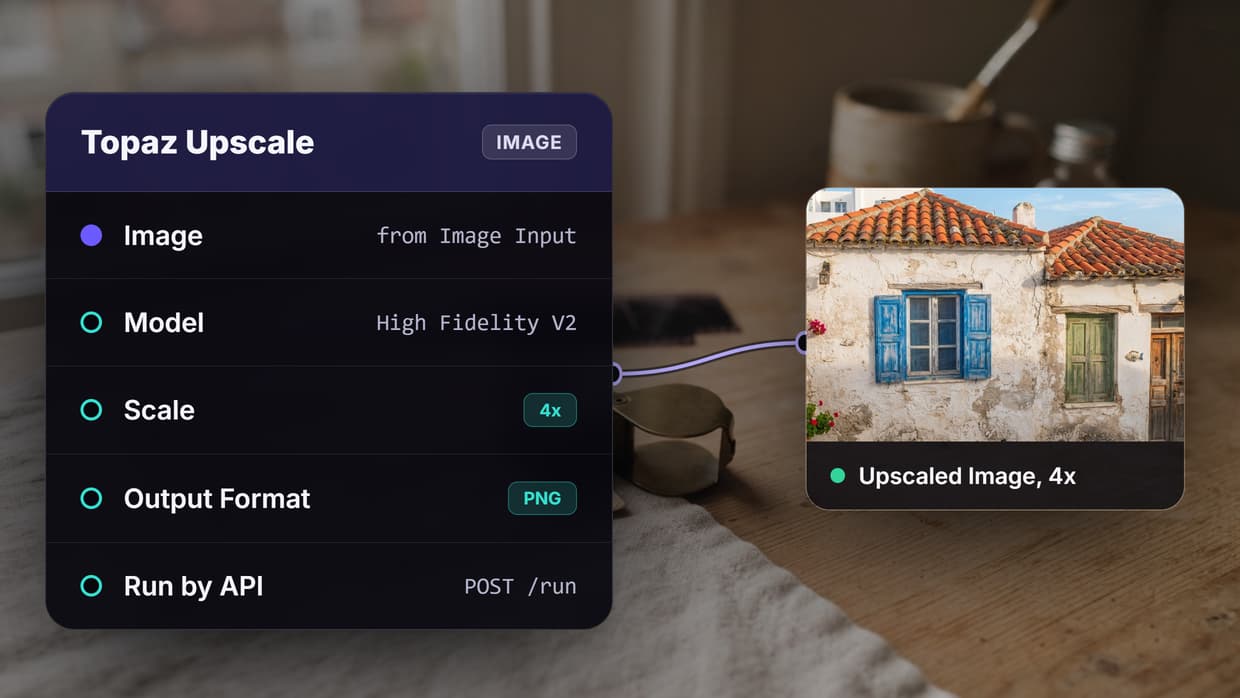
The second route treats Topaz as a node. You build a small graph once (an image input wired into a Topaz node), then call that graph by its ID. Adding a second upscaler, a denoise step or a video model after it changes the graph and not your integration code, which is how you chain AI models through one API.
| Node | Node type | Credits | Settings |
|---|---|---|---|
| Topaz Upscale | process:topaz_upscale_image | ~16 per image | Scale 1 to 4; Standard V1, Standard V2, High Fidelity V2, Graphics, Low Resolution V2 and one more; PNG, JPEG or WebP |
| Topaz Upscale Video | video:topaz_upscale_video | ~4 per second | Factor 1 to 4; Proteus, Artemis HQ, MQ and LQ, Nyx and 14 more; H.264 output |
| Topaz Upscale Video Precision | video:topaz_upscale_video_precision | ~10 per second at the 4K ceiling | Rhea, Iris, Proteus, Proteus Natural, Dione, Artemis, Gaia 2 and more; detail, noise, compression, halo and grain controls |
| Topaz Upscale Video Generative | video:topaz_upscale_video_generative | ~41 per second at the 4K ceiling | Starlight Precise 2.6 with softness 1 to 5, Starlight HQ, Mini, Sharp and Fast 2 |
One credit is $0.01, so a Topaz image costs about $0.16 and Topaz video about $0.04 to $0.41 per output second, less below 4K on the Precision and Generative nodes. For plain image jobs, Topaz's own credits are cheaper. The node route pays off when Topaz is one step of several, when you want to compare upscalers on the same input, or when you would rather not run a second account; plans are on the pricing page.
We ran this on 16 October 2026: one 1024 x 1024 product photo of a leather watch strap, wired into Topaz Upscale (Standard V2, 2x) and Crystal Upscaler (creativity 0, 2x) side by side. Both returned 2048 x 2048. Topaz took 20.3 seconds and returned a 6.4 MB PNG; Crystal took 6.3 seconds and returned a 1.1 MB JPEG. The run cost 22 credits, 16 for Topaz and 6 for Crystal, and the ClarityAI Crystal upscaler API page covers that second model on its own.
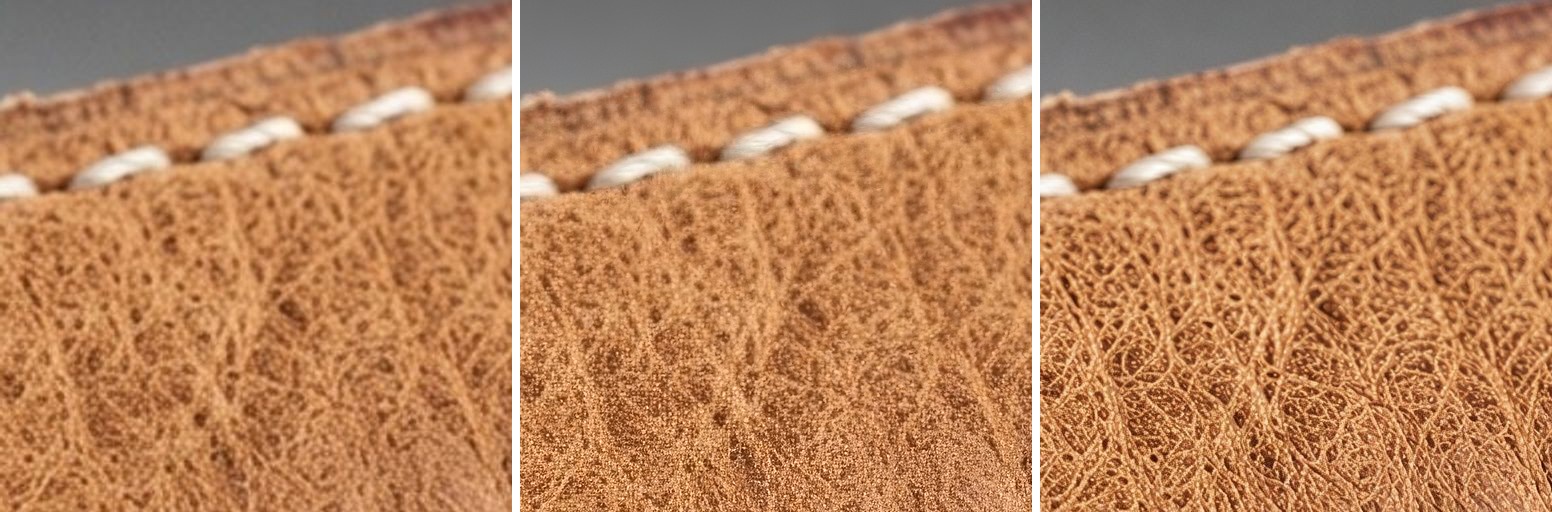
Left to right: the source enlarged with a plain bicubic resize, then Topaz, then Crystal. Topaz stays close to the original grain and adds fine texture without drawing new lines; Crystal draws crisper, higher-contrast creases that look sharper but move further from the photo. If your sources are soft rather than small, see how to sharpen blurry photos with AI.
Calling it from code
- Create a key. Generate one under Settings > API Keys. Keys start with
sk-and are shown once. - Read the inputs.
GET /api/v1/workflows/{id}/runreturns each input's node ID, type and default. - Start a run.
POST /api/v1/workflows/{id}/runwith aninputsmap. It returns 202, anexecutionIdand a poll URL. - Get the result. Poll until the status is
COMPLETEDorFAILED, or pass awebhookblock and receive a POST when the run finishes.
# 1. See which inputs the workflow takes
curl https://www.wireflow.ai/api/v1/workflows/YOUR_WORKFLOW_ID/run \
  -H "Authorization: Bearer sk-your-api-key"

# 2. Start a run with your image URL and an optional webhook
curl -X POST https://www.wireflow.ai/api/v1/workflows/YOUR_WORKFLOW_ID/run \
  -H "Authorization: Bearer sk-your-api-key" \
  -H "Content-Type: application/json" \
  -H "Idempotency-Key: strap-01-2x" \
  -d '{
    "inputs": { "IMAGE_NODE_ID": "https://example.com/photos/strap-01.jpg" },
    "webhook": { "url": "https://example.com/hooks/upscale", "secret": "your-signing-secret" },
    "metadata": { "sku": "STRAP-01" }
  }'

# 3. Poll instead, if you skipped the webhook
curl https://www.wireflow.ai/api/v1/workflows/executions/EXECUTION_ID/poll \
  -H "Authorization: Bearer sk-your-api-key"
The input is an HTTPS image URL rather than a file upload, and you never send the node graph: the server loads the saved workflow and injects your values. Sending the same Idempotency-Key on a retry replays the original run instead of billing a second one, as the Run API reference explains.
When the run ends, the webhook receives an execution.completed or execution.failed event, signed with an HMAC-SHA256 of the raw body when you set a secret, and the metadata you sent comes back so you can match each result to your own job. Failed deliveries are retried up to 12 times, and the webhooks docs show how to check the signature.
Batch runs
For a catalog of photos, loop over your rows and send one run per image, tagging each with metadata. Our walkthrough on batch image generation via API uses the same pattern with a spreadsheet as the source.
const photos = ["https://example.com/p/strap-01.jpg", "https://example.com/p/strap-02.jpg"];
const sleep = (ms) => new Promise((r) => setTimeout(r, ms));

for (const [i, url] of photos.entries()) {
  const body = JSON.stringify({
    inputs: { [IMAGE_NODE_ID]: url },
    webhook: { url: WEBHOOK_URL, secret: WEBHOOK_SECRET },
    metadata: { row: i },
  });
  let res;
  do {
    res = await fetch(`https://www.wireflow.ai/api/v1/workflows/${WORKFLOW_ID}/run`, {
      method: "POST",
      headers: {
        Authorization: `Bearer ${API_KEY}`,
        "Content-Type": "application/json",
        "Idempotency-Key": `${BATCH_ID}-${i}`,
      },
      body,
    });
    if (res.status === 429) await sleep(Number(res.headers.get("Retry-After") || 10) * 1000);
  } while (res.status === 429);
  if (res.status === 402) {
    const { requiredCredits, availableCredits } = await res.json();
    console.log(`Stopped at row ${i}: needs ${requiredCredits}, has ${availableCredits}`);
    break;
  }
}
A 429 carries a Retry-After header in seconds. A 402 is a credit pre-check that lists requiredCredits, availableCredits and a per-node breakdown before anything runs, so the loop stops cleanly instead of failing halfway. The executions docs cover the history endpoint for reconciling a batch afterwards.

Video through the same call
Video works the same way: swap the image node for one of the three Topaz video nodes and pass an HTTPS video URL. You set the factor and model on the node and never describe the source's frame rate or frame count. Billing is per output second, so a 5-second clip through the Precision node at 4K costs about 50 credits, and an AI video pipeline can run that upscale as its last step.
Which Topaz model to call
- Real footage that must stay faithful: the Precision node with Proteus, Rhea for talking heads and people, or Iris when faces need recovering.
- AI-generated clips: the Generative node with Starlight Precise 2.6. Softness runs from 1 (sharpest) to 5 (softest).
- Archival or interlaced footage: Starlight Mini on the Generative node, or Dione on the Precision node for interlaced sources.
- Animation: Gaia 2 on the Precision node, 2x only.
- Product photos and stills: Topaz Upscale with Standard V2, the model Topaz's own quickstart uses, run next to Crystal on the same input.
Try it yourself: Build this workflow in Wireflow. Swap in your own photo, run Topaz Upscale and Crystal Upscaler side by side, then call the same workflow from code with
POST /run.
FAQ
Is there an official Topaz upscale API?
Yes. Topaz Labs sells an Image API with the models behind Topaz Photo and Topaz Gigapixel, plus a Video API, all keyed with an X-API-Key header. Volume pricing and on-premise deployment go through its sales team. For other first-party model APIs, see our list of the best AI APIs for developers.
How much does the Topaz upscale API cost?
On Topaz's own API, a credit costs $0.08 to $0.12 and covers up to 24 MP of Gigapixel output; a 10-second 1080p Proteus clip takes 4 credits. As a workflow node, Topaz Upscale costs about 16 credits ($0.16) per image, and resellers price it differently again, as our comparison of hosted model pricing shows.
Is there a free Topaz API?
Topaz's API page says you can start without a credit card, but its $0 Starter tier was marked "coming soon" on 20 October 2026, and running the Topaz nodes on our side needs a paid plan. For a handful of photos, a consumer app may do; our photo enhancer roundup compares several.
Is the Topaz API synchronous or asynchronous?
Asynchronous in both quickstarts: images return a process_id you poll, and video jobs return a request ID you poll for a download link. A workflow run returns one execution ID even when it chains several models in one API call, plus an optional webhook.
Can Claude or another AI agent call the Topaz upscale API?
Yes, if the agent can call an HTTP endpoint or an MCP tool. A Claude Skill can plan the job, show the credit cost and wait for your yes before it runs a published workflow; the Claude Skill docs cover setup.
Should I use Topaz or Crystal for upscaling?
In our 16 October run on the same photo, Topaz stayed closer to the source texture, and Crystal produced crisper, higher-contrast detail in about a third of the time. Use Topaz when fidelity matters and Crystal when you want a sharper look; our guide to upscaling images with ClarityAI via API covers Crystal's settings.
Conclusion
Topaz's own API is usually the cheaper way to run its image models when Topaz is all you need, and its credit math is simple once you know the output size. The extra work sits around the call: multipart uploads, a five-step video flow, a separate account and key, and no way to compare another upscaler in the same request. Wireflow runs the four Topaz nodes in a workflow you call by ID, next to Crystal, Clarity and Magnific, and the AI asset pipeline page shows larger graphs built the same way.

Co-Founder & Operations at Wireflow
Runs client operations and content strategy at Wireflow. Works directly with creative teams and agencies to build production AI workflows.
- Content Strategy
- Client Operations
Make AI videos and ads.
Start free, no card needed.