How to Use AI for Concept Art and Game Design

In this article▾
- Why AI Is Changing Concept Art Pipelines
- Step 1: Choose the Right AI Tools for Your Project
- Step 2: Build Effective Prompts for Game Art
- Step 3: Set Up a Repeatable Workflow
- Step 4: Apply AI to Specific Game Design Tasks
- Step 5: Avoid Common Mistakes
- Comparison: AI vs Traditional Concept Art Workflows
- Frequently Asked Questions
Game studios and indie developers are using AI to accelerate concept art pipelines, explore visual directions faster, and cut iteration cycles from weeks to hours. Wireflow lets you chain multiple AI models into visual workflows, making it straightforward to go from a text prompt to production-ready concept art in a single pipeline. This guide walks through the practical steps for integrating AI into your concept art and game design process, covering tools, workflows, prompt strategies, and common pitfalls. Past concept boards, the same canvas can turn a brief into a finished character design and restyle it into any direction. For finished key art, you can run the same idea through a digital art creator workflow and restyle it in one pass.
Why AI Is Changing Concept Art Pipelines
Traditional concept art requires skilled artists spending days or weeks producing character sheets, environment paintings, and mood boards. AI image generators compress the exploration phase dramatically. A single artist can now generate 50+ variations of a character design in an afternoon, then spend focused time refining the strongest directions by hand. Studios report reducing asset production time by 30-40% when AI handles the initial ideation and variation stages.
The shift is not about replacing concept artists. It is about giving them better starting points. An artist who previously spent three days roughing out environment compositions can now use AI to generate dozens of options, pick the best framing and color palette, then paint over the result with full creative control. Many artists start even rougher, using a sketch generator to block in loose thumbnails before painting over the strongest one.
You can also paint a reference photo into a finished style, turning a plain plate into an oil or gouache concept frame in one pass.
Build this in Wireflow
Make the same kind of asset on a canvas you control, with a free account and no credit card.
Step 1: Choose the Right AI Tools for Your Project
Your tool choice depends on your project's IP sensitivity, visual style, and budget. Here is a breakdown of the most practical options for game concept art:
- Recraft V4 works well for stylized concept art with strong composition. It handles text overlays cleanly and produces design-quality output suitable for pitch decks and internal reviews.
- Stable Diffusion (local) is the best choice for IP-sensitive projects. Running models locally keeps proprietary character designs and world-building concepts off third-party servers. Studios working on unannounced titles often prefer this approach.
- Midjourney excels at atmospheric environments and mood pieces. Its default aesthetic leans toward painterly, cinematic compositions that work well for early visual development.
- Adobe Firefly is the safest option for assets that might ship in final production, since it is trained exclusively on licensed content.
For a hands-on look at building multi-step concept art pipelines, check out the concept art workflow on Wireflow.
Step 2: Build Effective Prompts for Game Art
Prompt engineering for concept art is different from casual image generation. You need consistency across assets, and that starts with structured prompts. Here is a template that works across most image generation models:
Character prompt structure:
[Character description] + [pose/action] + [clothing/armor details] + [art style] + [lighting] + [background context]
Environment prompt structure:
[Location type] + [time of day] + [weather/atmosphere] + [architectural style] + [art style] + [camera angle]
For example, a fantasy RPG character prompt might read: "A veteran dwarf blacksmith examining a freshly forged war axe, heavy leather apron over chainmail, soot-covered face lit by forge glow, fantasy concept art style, warm amber lighting, workshop interior with hanging tools."
Maintaining Visual Consistency
The biggest challenge with AI concept art is keeping characters and environments visually consistent across multiple outputs. Three strategies help:
- Create a style reference sheet. Generate one image you like, then reference its visual qualities in subsequent prompts using descriptors like "same color palette as reference" or "matching art direction."
- Lock your style keywords. Pick 3-5 style descriptors (e.g., "painterly, muted earth tones, soft rim lighting, gouache texture") and reuse them across every prompt in the project.
- Use image-to-image workflows. Feed your approved concept art back into the model as a starting image, then generate variations that stay within the established visual language. A style-transfer step locks that even tighter, repainting each new render to match one approved reference.
Step 3: Set Up a Repeatable Workflow
One-off image generation is useful for brainstorming, but production pipelines need repeatable processes. A well-structured workflow looks like this:
- Text prompt with your scene or character description
- AI generation using Recraft V4 or your preferred model
- Upscaling to production resolution for print or high-DPI screens
- Style transfer (optional) to match an existing art direction
This type of pipeline can be built visually using node-based editors where each step connects to the next. The advantage is that once the pipeline works, anyone on the team can run it with a new prompt and get results that match the project's visual standards.
For teams working across multiple art directions, you can save workflow templates for each style. A dark fantasy template might chain different models and post-processing steps than a cel-shaded mobile game template.
Step 4: Apply AI to Specific Game Design Tasks
Beyond character and environment art, AI can accelerate several other game design tasks:
UI and Icon Design
Generate icon sets, menu backgrounds, and HUD elements by prompting for specific dimensions and flat design styles. AI handles the batch generation of dozens of icon variants quickly, letting designers focus on layout and interaction design.
Level Design Visualization
Before building levels in-engine, use AI to generate overhead maps and perspective views of level layouts. Prompt with gameplay-specific details: "top-down dungeon layout, three branching paths, central boss room, fantasy stone architecture, grid-aligned corridors."
Marketing and Pitch Materials
AI-generated concept art works well for investor pitch decks, Steam store pages, and social media reveals. The key is generating at higher resolutions and in aspect ratios that match your target platforms. A reveal or event poster is the same job, and a poster generator on a canvas can render the key art with a legible title before upscaling it to print size. Tools like Xavier AI are also worth reviewing when evaluating your options for AI-assisted creative production.
Step 5: Avoid Common Mistakes
Several pitfalls trip up studios that are new to AI concept art:
- Over-relying on defaults. AI models have strong aesthetic biases. Without careful prompt engineering, every output looks like it came from the same project. Customize aggressively using style references and model chaining.
- Skipping the paint-over step. Raw AI output rarely matches a studio's exact needs. The best results come from treating AI output as an underpainting that human artists refine, correct, and polish.
- Ignoring licensing. Not all AI models are trained on licensed content. If your concept art might appear in shipped products, verify the model's training data provenance and your license terms.
- Generating without a brief. Just as you would brief a human artist, write detailed creative briefs before generating. Define the mood, palette, scale, and context for each asset you need.
Comparison: AI vs Traditional Concept Art Workflows
| Aspect | Traditional | AI-Assisted |
|---|---|---|
| Exploration speed | Days per direction | Minutes per direction |
| Visual consistency | High (single artist) | Requires prompt discipline |
| IP security | Full control | Depends on tool (local vs cloud) |
| Final quality | Production-ready | Needs paint-over for production |
| Cost per iteration | High (artist time) | Low (compute cost) |
| Best for | Final assets, hero pieces | Ideation, variations, mood boards |
Try it yourself: Build this workflow in Wireflow — the nodes are pre-configured with the exact concept art pipeline discussed above.
Frequently Asked Questions
Can AI fully replace concept artists in game development?
No. AI accelerates the ideation and exploration phases, but human artists are still needed for creative direction, paint-overs, consistency checks, and final production assets. Studios use AI to expand what their existing art team can accomplish, not to eliminate roles.
What is the best AI model for game concept art in 2026?
It depends on your needs. Recraft V4 produces clean, design-quality output. Midjourney excels at atmospheric environments. Stable Diffusion offers full local control for IP-sensitive projects. Adobe Firefly is safest for commercial use with clear licensing.
How do I keep AI-generated characters looking consistent across multiple images?
Use a fixed set of style keywords, reference the same color palette descriptors in every prompt, and use image-to-image generation to create variations from approved base images rather than generating from scratch each time.
Is AI-generated concept art safe to use commercially?
This varies by tool. Adobe Firefly is trained on licensed content and carries commercial rights. For other tools, review the terms of service carefully. Many studios use AI art only for internal ideation and create final assets by hand or through licensed pipelines.
How much does AI concept art cost compared to traditional methods?
AI generation costs range from free (open-source local models) to a few cents per image (cloud APIs). Traditional concept art from professional artists typically costs $50-200+ per piece. The real savings come from faster iteration, not from replacing artists entirely.
What resolution should I generate concept art at for game development?
For early ideation, standard 1024x1024 is fine. For pitch materials and Steam store assets, generate at the highest available resolution and upscale if needed. Most AI models now support up to 2048px on the longest side, and upscalers can push that to 4K or higher.
Can I use AI to generate 3D game assets, not just 2D concept art?
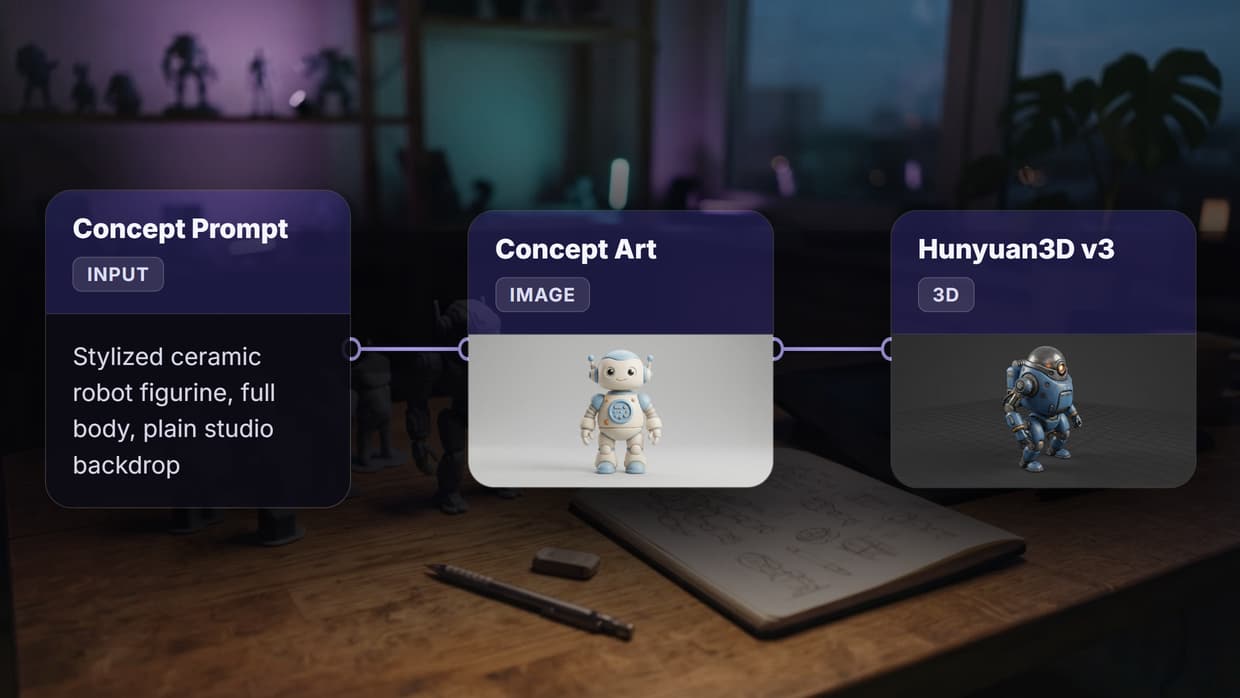
AI-generated 2D concept art can serve as input for 3D modeling pipelines. Some newer tools generate 3D meshes directly from text or image prompts, but quality is not yet consistent enough for production. Use 2D AI art as visual targets for 3D artists to model from. A Hunyuan3D image-to-3D workflow can also turn that reference into a starting mesh for the artist to clean up.
How do indie developers with no art background benefit from AI concept art?
Solo developers and small teams can use AI to create professional-quality visual prototypes, pitch materials, and placeholder assets. This helps validate game ideas visually before investing in professional art. It also helps when communicating creative direction to freelance artists you hire later.

Co-Founder & Operations at Wireflow
Runs client operations and content strategy at Wireflow. Works directly with creative teams and agencies to build production AI workflows.
- Content Strategy
- Client Operations
Get unlimited ad creatives today.
One call to see if we are a fit and scope the first ad. If it fits, your first batch lands inside week one.