Krea 3 Pricing: $0.03 to $0.06 an Image, Plans and API Access (2026)

In this article▾
Krea 3 pricing starts at $0.03 an image at 1K and $0.06 at 2K on Krea's API, and in the Krea app it runs on compute units from plans that start free. This guide breaks down both as Krea listed them on 19 October 2026, explains who can use the API today, and shows the closest image models you can run now on Wireflow, the node-based AI canvas we build. Krea 3 is not on Wireflow yet, and we sell another way to run image models, so check Krea's pages before you buy.
The short version: a typical product edit, a 2K image made from one 1K reference, costs $0.08 on the API, and Krea's own example prices 100,000 edits at 2K, without references, at $6,000 a month. The catch is access: the Krea 3 API is in early access for workspaces in Krea's beta, while the app version is open to everyone. For the Krea models you can already call from code, see our Krea AI API page.
What Krea 3 is
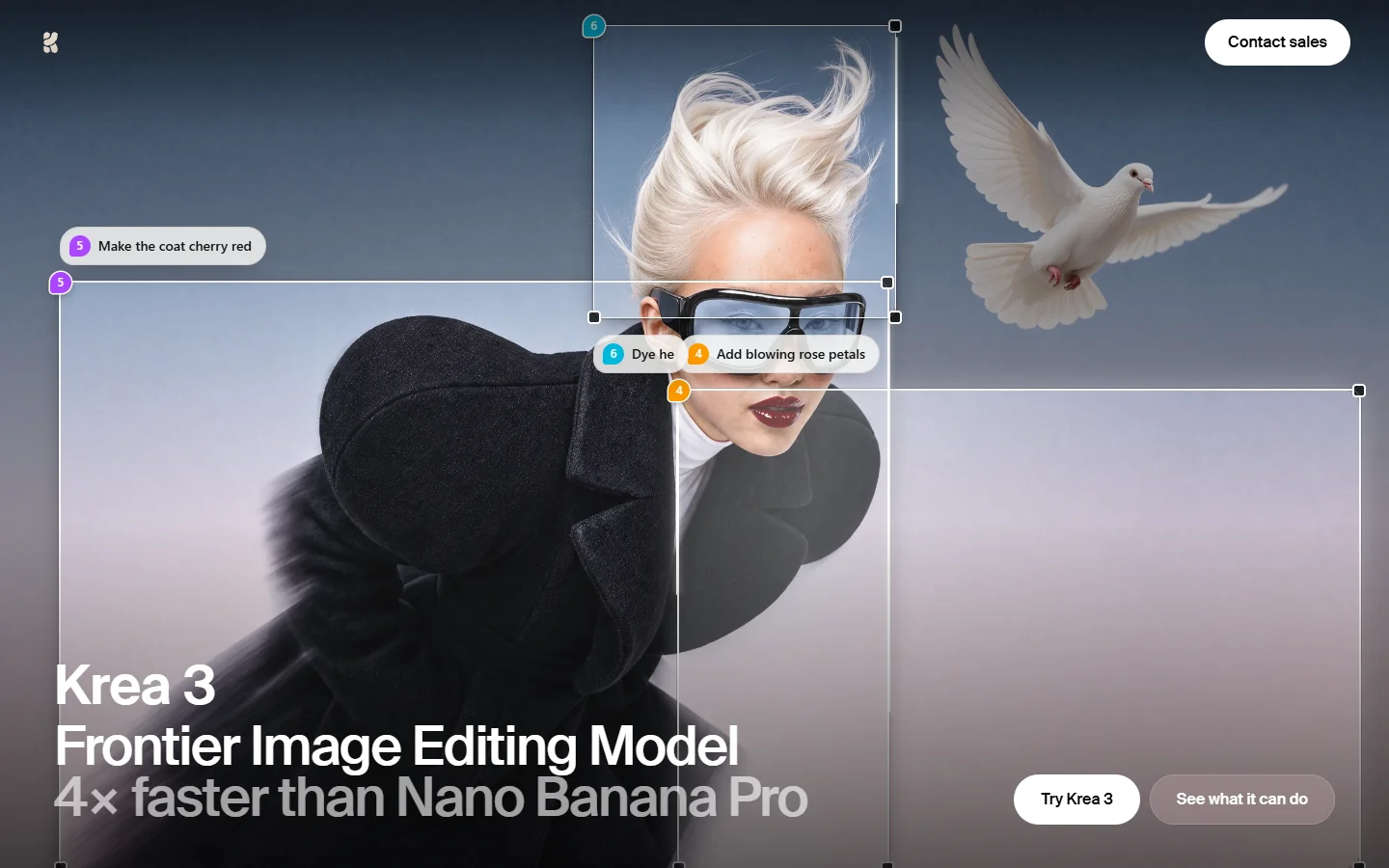
Krea released Krea 3 on 15 October 2026 as its new image editing model. You give it an image and a plain instruction, it changes what you asked for and keeps the rest, and Krea says most edits come back in under 8 seconds at native 2K. It also makes images from text, and on 16 October Krea made it the default image model in its app. Our AI image editor page covers the editing models it competes with.
- References: up to 8 reference images per API request, for people, products, places and styles.
- Regional edits: an API option that changes one part of the image and keeps the rest pixel-exact.
- Thinking modes: fast, the default, and high, for complex edits with several references.
- Output: 1K or 2K on the API. Krea 3 Ultra is in the app on Max plans and above.
- Not yet: style references and LoRAs return a "coming soon" error on the API.
- Self-hosting: Krea's FAQ says enterprise plans can run Krea 3 on their own GPUs.
Build this in Wireflow
Make the same kind of asset on a canvas you control, with a free account and no credit card.
Krea 3 API pricing
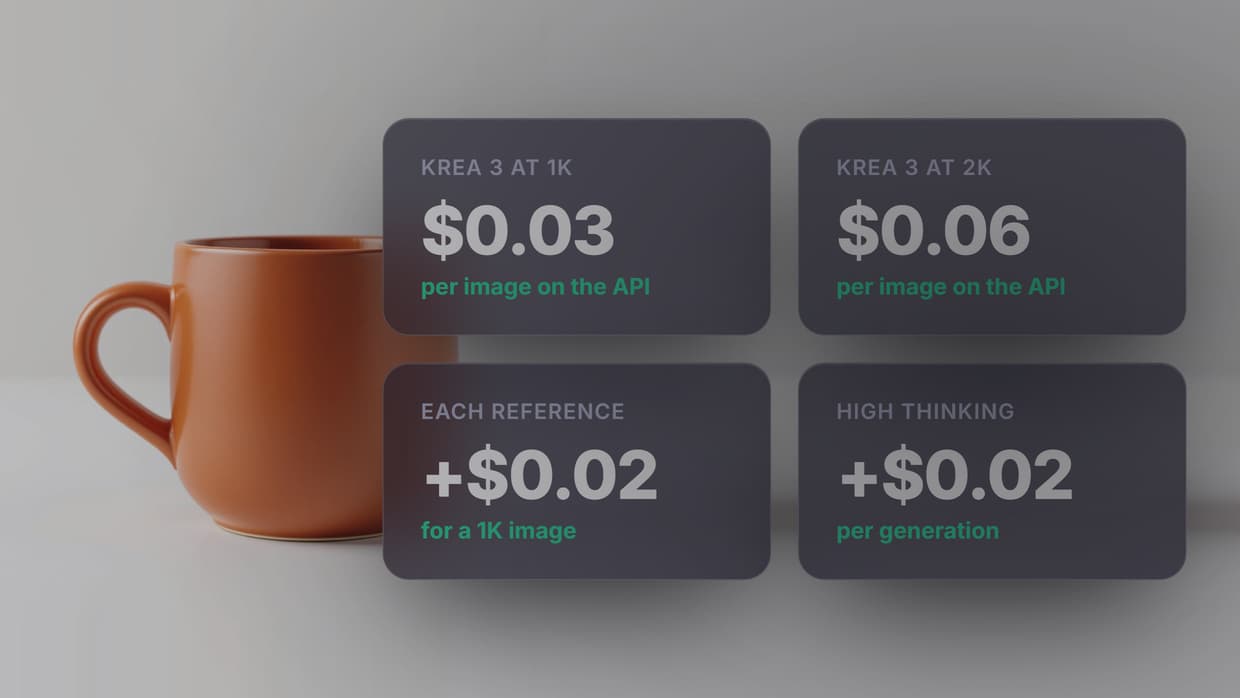
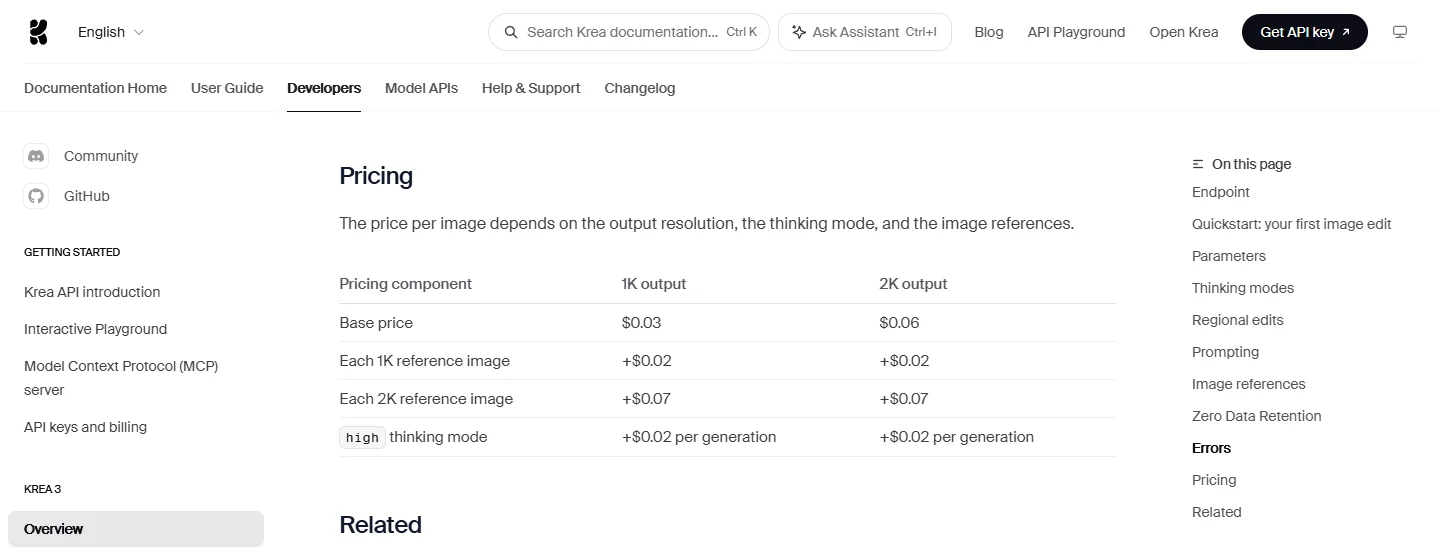
Krea prices each API image by output size, thinking mode and the reference images you send. This is the table from Krea's Krea 3 API docs on 19 October 2026.
| Pricing part | 1K output | 2K output |
|---|---|---|
| Base price | $0.03 | $0.06 |
| Each 1K reference image | +$0.02 | +$0.02 |
| Each 2K reference image | +$0.07 | +$0.07 |
| High thinking mode | +$0.02 | +$0.02 |
Here is what common jobs cost from that table:
| Job | Price per image |
|---|---|
| Text to image at 1K, fast mode | $0.03 |
| Text to image at 2K, fast mode | $0.06 |
| Product edit: 2K output from one 1K reference | $0.08 |
| Product edit: 2K output from one 2K reference | $0.13 |
| New scene from four 1K references, 2K output, high mode | $0.16 |
| 1,000 product edits at $0.08 each | $80 in total |
Reference images add up fast at 2K: four 2K references on a 2K edit cost $0.34, more than five times the base price. Krea's docs say about 1 MP is enough for most edits, so send references at 1K unless small text or logos need the detail.
Krea's FAQ says the launch price "is the list price" and that it expects prices "to go down, not up", and failed or cancelled jobs are not billed. For other editing APIs and what they charge, see our image editing API roundup.
Who can use the Krea 3 API
On 19 October 2026 Krea's docs said the Krea 3 API is in early access: "Only workspaces in the Krea 3 beta can call it", and you ask Krea's sales team to join. Once you are in, API calls draw from a separate US dollar balance on your workspace, not from app compute units. Top-ups start at $5, with preset amounts of $10, $25, $50 and $100, and there is no public endpoint for checking that balance from code.
Two more details for developers. The old thinking mode values, instant and medium, stop working on 23 October 2026, so send fast and high. And with five or more references in one request, Krea resizes each to at most 1,536 px on its longest side. If you need an image API with open sign-up today, our text-to-image API page shows one way to call several models.
Krea's launch post also names partners that serve Krea 3: fal, Hedra, Together AI, Nous Research, OpenRouter and Replicate. Their prices and access rules are their own, so check each one before you build on it.
Krea 3 in the Krea app
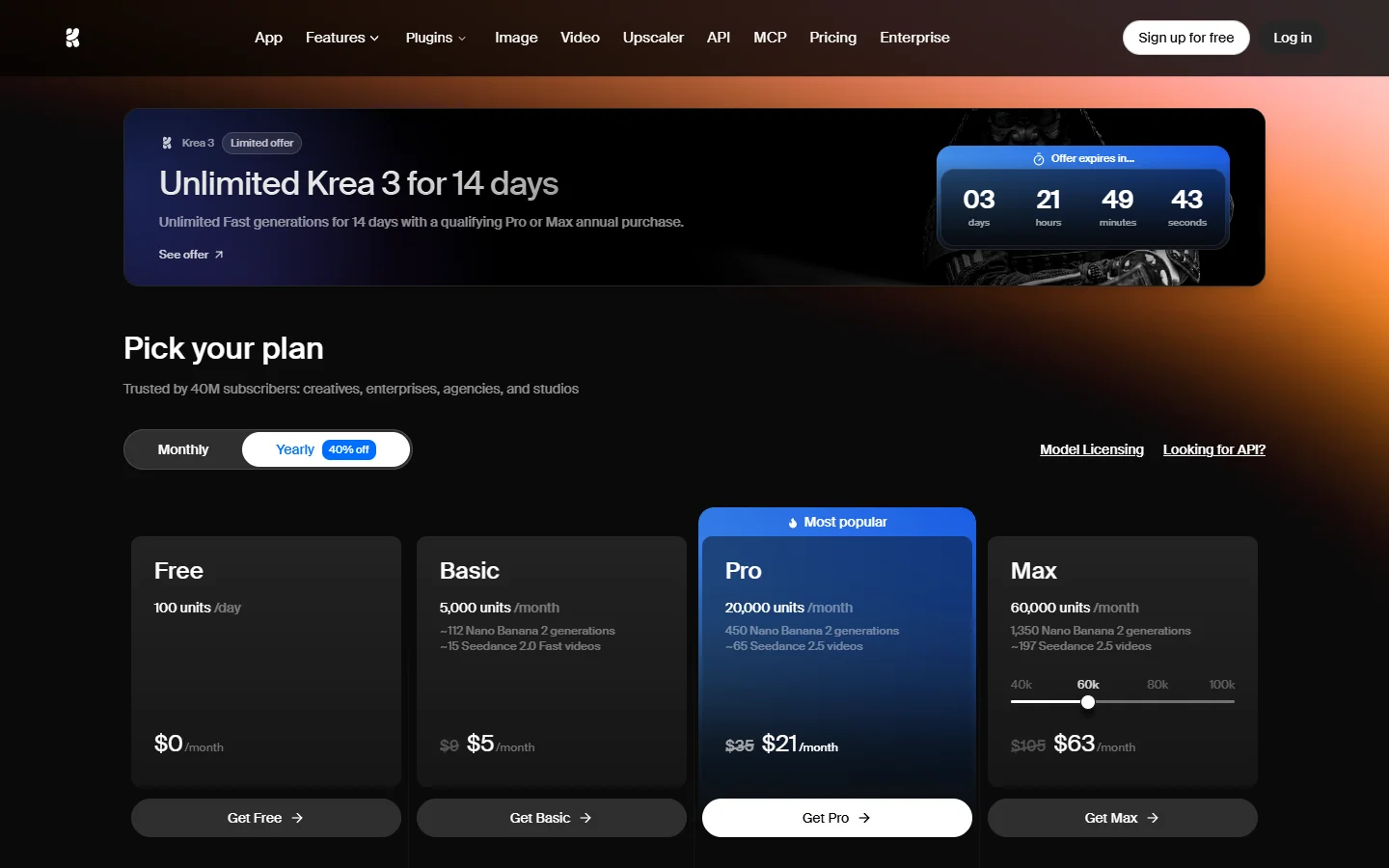
In the app, Krea 3 is open to everyone and uses compute units like Krea's other models. Krea does not publish a fixed unit cost for it; its guide says to "check the model picker for the cost of your selected settings". These are the plans on Krea's pricing page on 19 October 2026.
| Plan | Price | Compute units | Krea 3 |
|---|---|---|---|
| Free | $0 | 100 a day | Included |
| Basic | $9 a month | 5,000 a month | Included |
| Pro | $35 a month, or $21 a month billed yearly | 20,000 a month | Included |
| Max | See Krea's pricing page | From 40,000 a month | Included, plus Krea 3 Ultra |
| Business | $200 a month, or $160 a month billed yearly | 80,000 a month, up to 50 seats | Included |
Units on Basic, Pro and Max reset each month and do not roll over; Business and Enterprise can roll them over. Extra packs of 2,000 to 50,000 units last 90 days. On 19 October a limited offer gave unlimited fast Krea 3 generations for 14 days with a qualifying Pro or Max yearly purchase, with about 3 days left on its countdown. For product work, our guide to AI product photography covers the kind of edit Krea 3 is built for.
Krea 3 against other editing models, by Krea's numbers
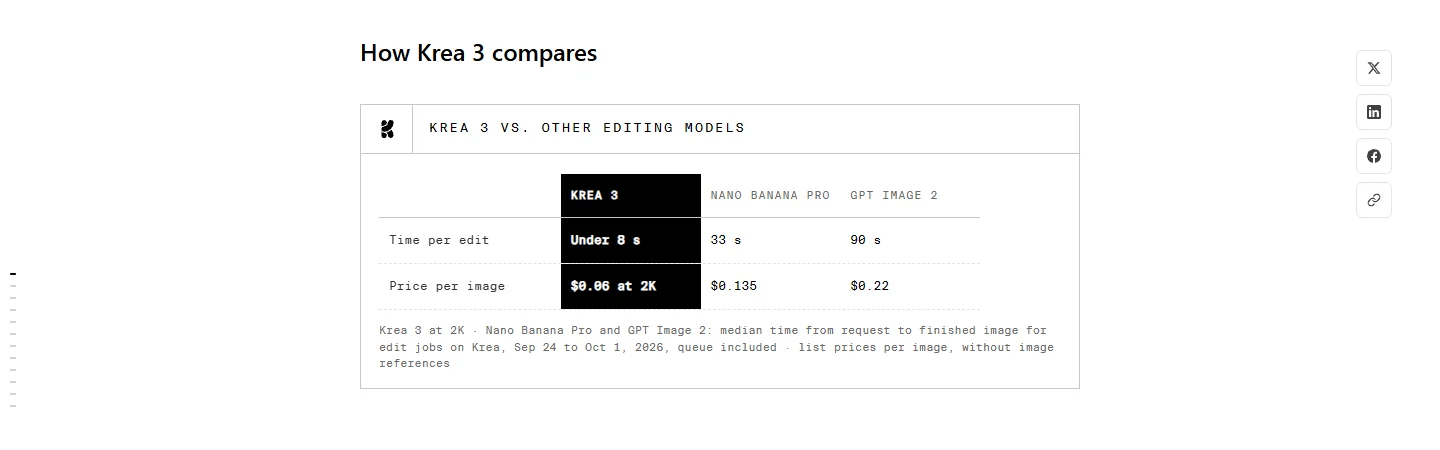
Krea published this comparison at launch, measured on its own platform from 24 September to 1 October 2026, queue time included. These are Krea's figures, not our tests.
| Model | Time per edit | Price per image |
|---|---|---|
| Krea 3 | Under 8 seconds | $0.06 at 2K |
| Nano Banana Pro | 33 seconds | $0.135 |
| GPT Image 2 | 90 seconds | $0.22 |
All three prices are list prices without image references, and the times are medians on Krea's own queue. For how a newer OpenAI model does on the same kind of job, see GPT Image 2.5 on Wireflow.
Krea 3 on Wireflow: coming soon
Krea 3 is not in Wireflow's node catalog yet; we checked on 19 October 2026. We plan to add it as a node as soon as we can, and we will update this page the day it is live. Until then, Wireflow runs Krea 2 and several editing models. The rates below come from its catalog the same day, at each node's default settings, with dollars at the plan prices: $24 for 1,600 credits on Starter and $45 for 4,300 on Professional.
| Model on Wireflow | Closest Krea 3 job | Credits an image | Starter | Professional |
|---|---|---|---|---|
| Krea 2 Turbo | Fast text to image with style references | 5 | $0.08 | $0.05 |
| Krea 2 Medium | Text to image with style references | 10 | $0.15 | $0.10 |
| Krea 2 Large | Highest quality Krea 2 | 19 | $0.29 | $0.20 |
| FLUX 3 Image Edit | Edits with up to 10 reference images | 15 | $0.23 | $0.16 |
| Ideogram 4.5 Edit | Precise edits, text changed in place | 19 | $0.29 | $0.20 |
| Nano Banana 2.1 | Edits and combines up to 10 images | 20 | $0.30 | $0.21 |
| GPT Image 2.5 Flare Edit | A real product placed in a new scene | 20 | $0.30 | $0.21 |
Krea 2 makes images from text with optional style references; it does not edit an input image the way Krea 3 does. For editing, the closest are FLUX 3 Image Edit and Nano Banana 2.1.
To be plain about price: Krea 3's base API price, $0.06 at 2K or $0.08 with one 1K reference, is lower than every editing model in this table. If cost per edit is all that matters and your workspace is in the beta, Krea's API is the cheaper route. Wireflow fits when the edit is one step in a longer job, such as a product photo, three edits and a video, run together as a batch AI generation workflow from one API call.
Which option fits
- Lowest cost per edit at volume: the Krea 3 API, once your workspace is in the beta.
- Trying Krea 3 now, no API: the Krea app. The Free plan includes it with 100 units a day.
- Krea's look without the wait: Krea 2 Turbo, Medium or Large on Wireflow.
- Edits inside a pipeline: FLUX 3 Image Edit or Nano Banana 2.1 on Wireflow, chained with your other steps.
FAQ
How much does Krea 3 cost?
On Krea's API, $0.03 an image at 1K and $0.06 at 2K, plus $0.02 for each 1K reference image, $0.07 for each 2K reference and $0.02 for high thinking mode. In the Krea app it uses compute units from your plan, from Free at 100 units a day up to Business.
Is Krea 3 free?
Krea 3 is included on the Free plan in the Krea app, which gives 100 compute units a day. Krea does not publish how many units one Krea 3 image uses; the model picker shows the cost.
Who can use the Krea 3 API?
As of 19 October 2026, only workspaces in the Krea 3 beta, and you ask Krea's sales team for access. Krea also lists fal, Hedra, Together AI, Nous Research, OpenRouter and Replicate as partners that serve Krea 3.
Will Krea 3 prices change?
Krea says the launch price is the list price, not a subsidy, and that it expects prices to go down, not up.
How many reference images can Krea 3 use?
Up to 8 per API request. With five or more, each one is resized to at most 1,536 px on its longest side, so send four or fewer when fine detail matters.
What resolution does Krea 3 support?
1K or 2K output on the API, with 1K as the default. Krea renders 2K natively, and Krea 3 Ultra is available in the app on Max plans and above.
Can I run Krea 3 on Wireflow?
Not yet. Wireflow runs Krea 2 Turbo, Medium and Large today, at 5 to 19 credits an image, plus editing models such as FLUX 3 Image Edit and Nano Banana 2. We plan to add Krea 3 and will update this page when it is live.
Conclusion
Krea 3 is priced for volume: $0.06 for a 2K edit plus a few cents per reference on the API, and open to everyone in the Krea app on compute units. The open question is API access, which is still limited to Krea's beta. If you need an image editor you can call today, or Krea 2 inside a longer workflow, build it as an AI product photo generator workflow on Wireflow, and check back here for Krea 3.

Co-Founder & Operations at Wireflow
Runs client operations and content strategy at Wireflow. Works directly with creative teams and agencies to build production AI workflows.
- Content Strategy
- Client Operations
Get unlimited ad creatives today.
One call to see if we are a fit and scope the first ad. If it fits, your first batch lands inside week one.