AI Short Drama: How We Made One Episode, With Every Prompt and Cost

In this article▾
An AI short drama is a vertical, phone-first serial whose script, cast, voices and shots come from AI models. We made one full 15-second episode for 251 credits. This guide gives every prompt, the time each step took and the one shot the content filter blocked four times, all built on Wireflow, the node-based AI canvas we build.
Results at a glance
Every number below comes from one run on 15 October 2026, built as an AI video workflow with one node per step, so each shot can be checked and re-run on its own.
| Measure | Our run |
|---|---|
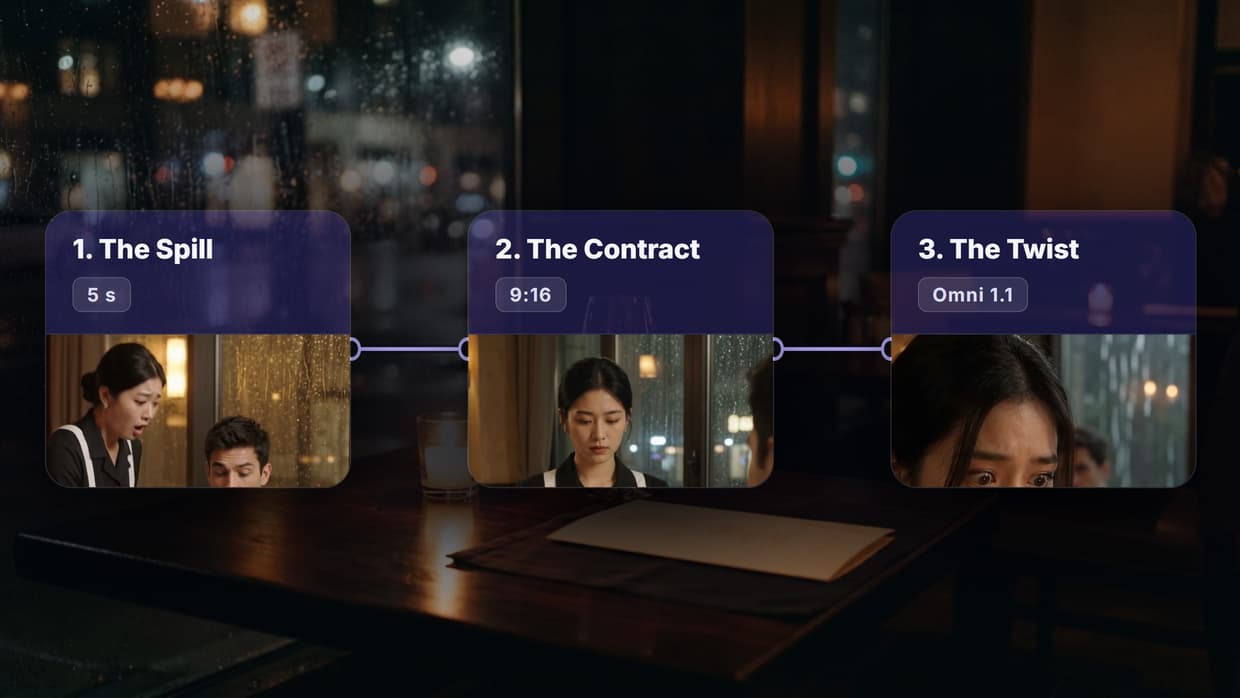
| Finished episode | 15.0 s, 1080x1920, 30 fps, 3 shots, 3 spoken lines |
| Script (Claude Sonnet 5) and two character photos | 23 s, 11 credits |
| Each 5-second shot (Gemini Omni Flash 1.1, 720p) | 34 to 52 s, 80 credits |
| Final cut (Video Editor node) | 80 s, 0 credits |
| Total charged | 251 credits |
| First run to final cut | 11 min 18 s, including 4 blocked attempts on one shot |

Click the silent loop for the MP4 with dialogue. Nothing was fixed by hand, so every frame came from the prompts below, as a text to video AI clip does.
Build this in Wireflow
Make the same kind of asset on a canvas you control, with a free account and no credit card.
What counts as an AI short drama
Short dramas, also called micro or vertical dramas, are phone serials: one to two minute episodes in 9:16, each ending on a cliffhanger. MIT Technology Review reported in May 2026 that DataEye counted an average of 470 AI-generated short dramas released per day in January, made with models such as Nano Banana, Seedance and Kling. That volume is why AI tools for filmmakers now sit in the middle of production.
Our episode is short on purpose: three shots test what breaks in every AI series, namely the same faces in each shot, voices and the cut. The top guides we read skip a real run with prompts and costs, so this page adds one, holding the cast steady with a reference-photo step like an AI character creator.
The workflow, node by node
- Premise and cast notes in a Text node.
- Episode Script (Claude Sonnet 5): a Run any LLM node with a second Text node as its system prompt.
- Mei and Daniel (GPT Image 2.5 Flare): one 768x1024 reference photo per lead.
- Shot 1, 2 and 3 Prompt: one Text node per shot.
- Shot 1, 2 and 3 (Gemini Omni Flash 1.1): both photos wired into Reference Images, 9:16, 720p, 5 seconds, with voices and room sound.
- Episode Cut (Video Editor): the three clips in order at 1080x1920 with their sound.
Swapping Omni for Seedance, or Claude for another LLM, changes one node, which is why AI model chaining suits serial work.
Step 1: the premise and the script
Premise: Late at night in a quiet upscale restaurant, Mei, a young waitress, spills red wine on Daniel, a cold CEO dining alone. Instead of getting her fired, he slides a contract across the table. The episode ends the moment she sees something in it that should be impossible.
Cast notes: Mei: woman, mid 20s, East Asian, black hair in a low bun, black waitress uniform with a white apron, small silver earrings. Daniel: man, early 30s, short dark hair, charcoal suit, white shirt open at the collar, silver watch.
Location: candlelit restaurant with dark wood tables, warm amber light, rain on the tall window behind Daniel's table.
The system prompt asked for JSON with three 5-second shots (hook, turn, cliffhanger), one line of 10 words or fewer each, and video prompts that open with the camera, call the leads "the woman from reference image 1" and "the man from reference image 2", and repeat their wardrobe. Rules like these make AI workflow templates worth saving.
Claude answered in 8.7 seconds with "The Contract" and wrote the twist itself: the contract names Mei's mother, dead for ten years. It also wrapped the JSON in code fences and dropped a field we asked for. After the blocked shot below, we replaced the automatic hand-off with Text nodes so a person reads each shot before paying for it, the check a storyboard generator gives you.
Step 2: lock the cast with reference photos
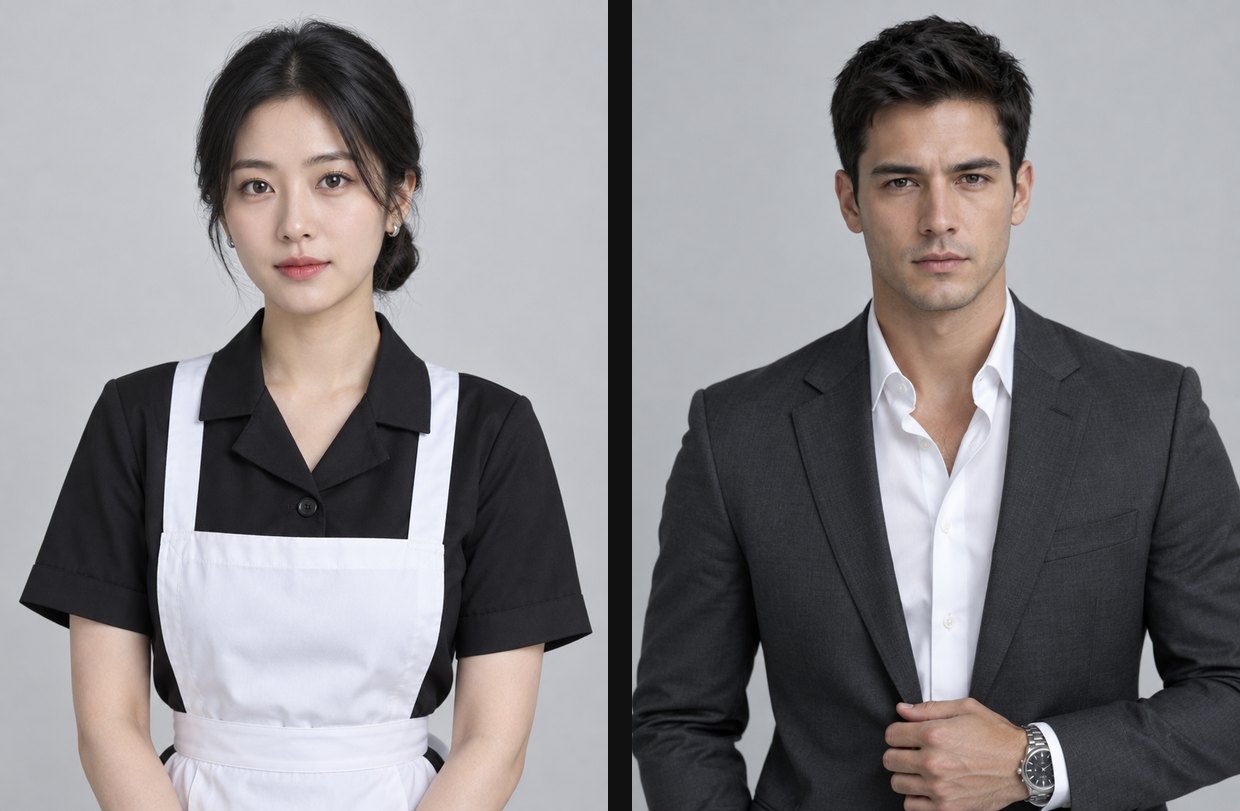
Character reference photo for a short drama. A woman in her mid 20s, East Asian, black hair in a low bun, wearing a black waitress uniform with a white apron and small silver earrings. Waist-up, facing the camera, calm expression, plain light grey studio backdrop, soft even light, photorealistic, sharp focus on the face. No text.
Character reference photo for a short drama. A man in his early 30s with short dark hair, wearing a charcoal suit, a white shirt open at the collar and a silver watch. Waist-up, facing the camera, cold calm expression, plain light grey studio backdrop, soft even light, photorealistic, sharp focus on the face. No text.
Each photo took about 12 seconds. A plain backdrop and even light give the video model a clean read of each face and outfit, the same approach our character design generator uses for any recurring cast.
Step 3: film each shot with voices
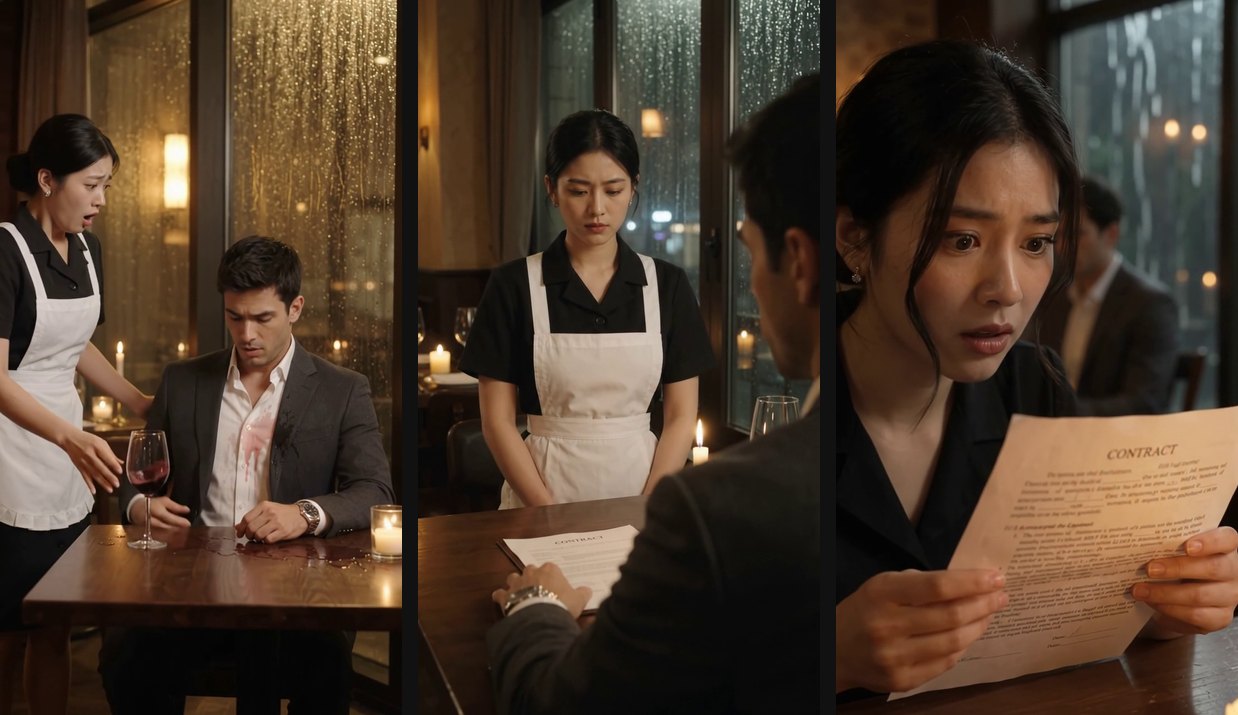
Shots 1 and 3 are Claude's prompts unchanged; shot 2 is the version that passed the filter.
Shot 1: Vertical 9:16, medium shot at chest height, camera static then a slight handheld jolt on impact. The woman from reference image 1, black hair in a low bun, black waitress uniform with white apron, small silver earrings, stumbles and tips a wine glass, red wine splashing across the white shirt of the man from reference image 2, charcoal suit, white shirt open at collar, silver watch, seated alone. She gasps, "Oh god, I am so sorry, sir," voice shaking. Candlelit restaurant, dark wood table, warm amber light, rain streaking the tall window behind him.
Shot 2: Vertical 9:16, medium over-the-shoulder shot from behind the man from reference image 2: the back of his head and his charcoal suit shoulder fill the foreground, his face never turns to the camera. His hand, silver watch catching candlelight, slides a folded contract across the dark wood table toward the woman from reference image 1, who stands facing the camera, black hair in a low bun, black waitress uniform with white apron, small silver earrings, staring at the paper. He says flatly, "Don't apologize. Just read this contract." Candlelit restaurant, warm amber light, rain streaking the tall window.
Shot 3: Vertical 9:16, extreme close-up on the woman from reference image 1, black hair in low bun, small silver earrings catching candlelight, her eyes widening as she scans the open contract page held in trembling hands, the man from reference image 2 blurred in charcoal suit behind her. She whispers, "This has my mother's name... she's been dead ten years," breath catching. Candlelit restaurant, dark wood table, amber light trembling across the page, rain sheeting down the tall window behind Daniel's empty chair.
A speech-to-text check of the cut found all three lines word for word, starting at 2.0, 6.7 and 10.8 seconds. Faces, bun, apron, suit and watch held in every shot. The slips: loose strands in Mei's bun in shot 3, a wine glass that is full again after the spill, and a shot 3 prompt that calls Daniel's chair empty while placing him behind her. Omni generates each voice fresh per clip with nothing holding it steady, so a full season needs a fixed voice plus a lip-sync step.
The shot the content filter blocked four times
Shot 2 kept failing with "Blocked by the content filter. This usually means the image or prompt looked like a real person or other restricted content."
| Attempt | What we changed | Result |
|---|---|---|
| 1 | Claude's prompt: low-angle push-in on Daniel, line "Sign this, and your debts disappear tonight" | Blocked |
| 2 | Same prompt, run again | Blocked |
| 3 | Over Mei's shoulder, Daniel at medium distance facing the camera | Blocked |
| 4 | Claude's framing with the line "Don't apologize. Just read this contract." | Blocked |
| 5 | Camera behind Daniel, his face never toward the camera | Passed in 34 s |
The same photos passed in shots 1 and 3, where Daniel is turned toward Mei or out of focus. Every blocked version showed his face to the camera and the pass did not; five attempts make a pattern, not a rule, but move the camera before rewriting the words. The run log shows 0 credits per block, yet the node warns repeated blocks are not refunded, so budget a spare shot. More on the model: Gemini Omni Flash.
Step 4: the cut and the cost
The Video Editor node plays three 150-frame scenes at 30 fps with their sound, scales the 720x1280 clips to 1080x1920 and adds "To be continued" over the last second. The hosted render took 80 seconds and 0 credits for a 9.9 MB MP4, the job of a headless video editor.
We added no subtitles, which most short drama apps burn in; a captions node would come next, for the same sound-off viewers who watch Instagram Reels that travel.
Run in one pass with no blocks, the flow takes about three and a half minutes. A 90-second episode at these settings needs 18 shots, or 1,440 credits of video before retries; the pricing page lists what a credit costs on each plan.
Try it yourself: Build this workflow in Wireflow. Change the premise, run the script, paste each shot into its prompt node, then run Episode Cut for a new episode.
FAQ
What is an AI short drama?
A vertical serial for phones, one to two minutes per episode, ending on a cliffhanger, with the script, actors, voices and shots made by AI, from a language model to an AI video generator.
How long should an AI short drama episode be?
Usually 60 to 120 seconds. A full episode repeats our steps with more shots, as in our guide to making a full movie with AI.
How do you keep the same characters in every shot?
Wire the same reference photo of each character into every shot and repeat each wardrobe word for word, as covered in creating AI characters for stories.
How much does an AI short drama episode cost?
Ours charged 251 credits: 11 for the script and photos, 80 per 5-second shot at 720p, and 0 for the cut. Blocked attempts can add more.
Can AI make the voices too?
Yes. Gemini Omni Flash 1.1 spoke all three lines word for word, but nothing holds a voice steady between clips, so long series need a fixed voice from an AI voiceover generator.
Why was my AI video shot blocked by the content filter?
The filter flags images or prompts that look like a real person. Ours blocked every version showing the male lead's face to the camera and passed the one shot from behind him.
Do I need to write the script myself?
No. Claude Sonnet 5 wrote ours, twist included, in under 9 seconds. Read it before spending video credits.
Conclusion
One premise, two reference photos and three 5-second shots made a 15-second cliffhanger for 251 credits; the content filter and the continuity check took the judgment, not the generation. Wireflow keeps each step in its own node, so a blocked shot or a wrong prop is one re-run, and our AI video pipeline page shows how to run the chain episode after episode.

Co-Founder & Operations at Wireflow
Runs client operations and content strategy at Wireflow. Works directly with creative teams and agencies to build production AI workflows.
- Content Strategy
- Client Operations
Get unlimited ad creatives today.
One call to see if we are a fit and scope the first ad. If it fits, your first batch lands inside week one.