CapCut API: What Exists in 2026 and What to Use Instead

In this article▾
There is no official CapCut API for editing or rendering video. CapCut's terms ban scripted access, and the GitHub projects named CapCutAPI write draft files you still open in the app. This guide covers what each route can and cannot do, then shows how to generate, caption and render a vertical short with one HTTP call on Wireflow, the node-based AI canvas we build.
Quick answer
| Question | Answer (checked 15 October 2026) |
|---|---|
| Does CapCut have a public editing or render API? | No. We found no developer portal on capcut.com, and developers.capcut.com has no public DNS record |
| Can I get a CapCut API key? | Not for editing. Nothing on CapCut's own domains issues one |
| What is "CapCutAPI" on GitHub? | Community projects that write CapCut or JianYing draft files, not ByteDance products |
| Do CapCut's terms allow automation? | No. They ban using "automated scripts or other technologies to ... interact with the Services" |
| What do developers use instead? | A hosted render API or a workflow API that returns the finished MP4 |
In short, the features you want (auto captions, templates, export) only run inside CapCut's own apps. Below are the three things people mean by "CapCut API" and which one fits your job. For the wider field, see our roundup of AI video editing APIs.
Build this in Wireflow
Make the same kind of asset on a canvas you control, with a free account and no credit card.
What CapCut offers developers today
CapCut is a free video editor from ByteDance for mobile, desktop and web. When we checked on 15 October 2026, capcut.com/business redirected to commercepro.capcut.com, which redirected again to pippit.ai, ByteDance's AI marketing video tool. None of those pages documents an API, an SDK or a developer key. If you need creation and editing behind an endpoint, a video creation and editing API is the category to evaluate.
Some vendor pages describe an official CapCut "Open Platform" for in-editor plugins, or an "AI API" for background removal and upscaling. We found neither on a CapCut or ByteDance domain, and developers.capcut.com, which one third-party listing links to, returned "Non-existent domain" from Google's public DNS. Treat such claims as unverified, and compare them with video generation APIs that publish reference docs.
The CapCut terms of service, last updated 15 April 2026, set the boundary. Section 6 bars users from using "automated scripts or other technologies to collect information from or otherwise interact with the Services" and from trying to "reverse engineer, disassemble, decompile" them. That covers any wrapper that drives the app or calls its private endpoints, and it is one reason teams move repeatable edits to a headless video editor for automation.

The open-source "CapCutAPI" projects
Search GitHub for CapCut API and you find community projects that generate CapCut or JianYing (CapCut's Chinese-market edition) draft folders from code. None is affiliated with ByteDance. Some expose a local HTTP server, some an MCP server for AI agents, and some are plain command-line tools, the same split you see across MCP servers for video editing.
| Project | How you call it | What it produces | Notes (mid-October 2026) |
|---|---|---|---|
| VectCutAPI (credits the CapCutAPI community) | Python HTTP server on port 9001, plus an MCP server | New draft folders you copy into CapCut | Apache-2.0, about 2.3k GitHub stars; cloud render code not open-sourced |
| capcut-mate | FastAPI service | JianYing drafts you download | About 1.8k stars; works with Coze and n8n |
| capcut-cli | Node command line, no server | Edits draft_content.json in place, with Whisper captions | About 480 stars; states it is not affiliated with ByteDance |
The most-starred of these, VectCutAPI, shows the pattern. You run python capcut_server.py, send requests such as /add_video and /add_text to localhost:9001, then call save_draft, which writes a folder starting with dfd_. You copy that folder into CapCut's drafts directory, open the desktop app and export. It needs Python 3.10 or later, FFmpeg and a local CapCut or JianYing install. Its MCP server lets an agent run the same steps, a pattern we cover in connecting Claude to video editing.
capcut-mate does the same for JianYing as a self-hosted service, and capcut-cli edits an existing draft file directly. Both pre-build a project for a person to finish; an agent that edits video on a hosted backend finishes unattended.
Where draft-file tools break
- Export stays manual. The open-source code stops at a draft. A person opens CapCut and clicks Export.
- The format moves. A community review tested in May 2026 found that JianYing 6.0 and later store draft_content.json AES-encrypted, and that CapCut 8.4, 8.7 on Windows and 9.3 reject drafts built from old templates with "This draft comes from an unconventional path and cannot be used."
- The terms. Anything that drives the app or calls private endpoints sits against section 6 above.
- No queue. No webhooks, retries or published rate limits.
For a few edits a week, a draft generator plus a person on Export works. For hundreds of videos a month, read how teams automate UGC video creation with no desktop app in the loop.
What to use instead: an API that returns the MP4
What most developers want is simple: send a prompt or footage plus caption text, get back a finished vertical MP4. Hosted render APIs such as JSON2Video, Shotstack and Creatomate do the render step from a JSON timeline, and our Creatomate vs Shotstack comparison covers two of them. All three assume you already have the footage.
A workflow API adds the generation step. Each node is a model or an editing step, and one execute call runs the graph in order. That is the one workflow API over many models approach: the same call can make a frame with an image model, animate it with a video model, then caption and render it in an editor node.
| Job | CapCut app | Draft-file wrapper | JSON render API | Workflow API |
|---|---|---|---|---|
| Generate footage from a prompt | In the app only | No | No | Yes, model nodes |
| Burn in captions | Yes, by hand | Writes the caption track | Yes | Yes, editor node |
| Render the MP4 on a server | No | No (open-source code) | Yes | Yes |
| Start from code, n8n or Zapier | No | Local HTTP only | Yes | Yes, REST and webhooks |
| Fits CapCut's terms | Yes | Doubtful | Not involved | Not involved |

Example: one call that generates, captions and renders
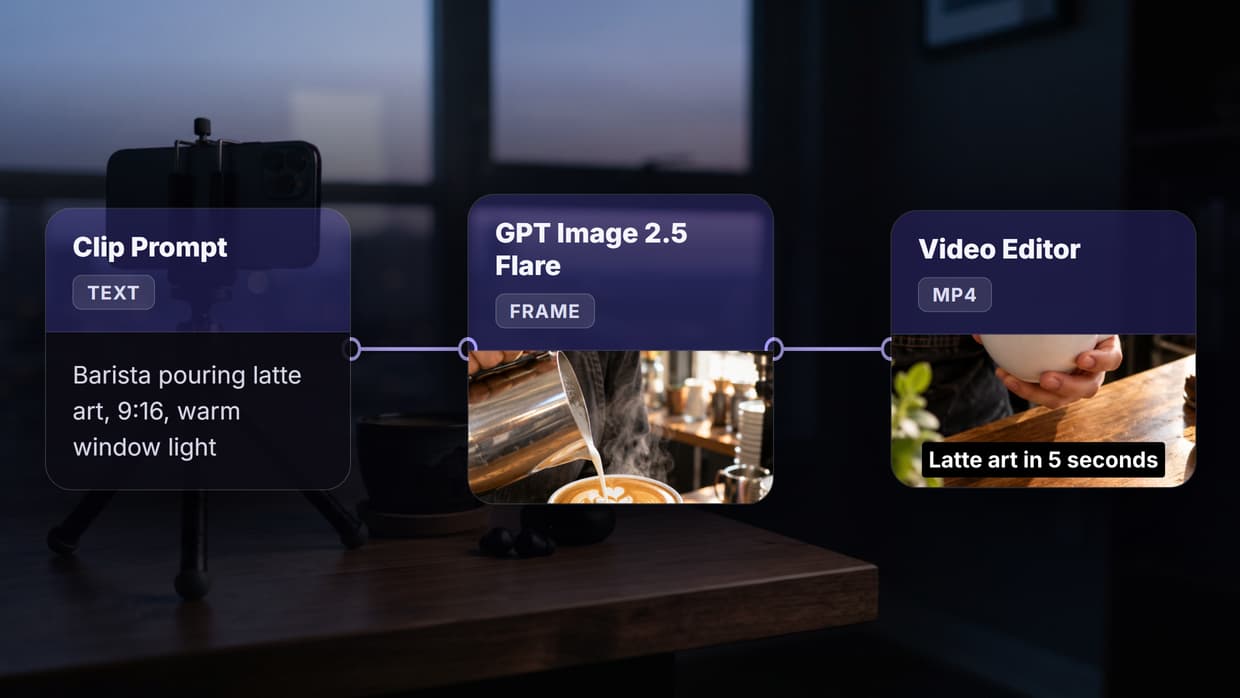
We built this as a three-node workflow on 15 October 2026. A text prompt feeds a GPT Image 2.5 Flare node that makes a 9:16 frame, and a Video Editor node adds a slow zoom, burns in the caption "Latte art in 5 seconds" and renders the MP4. The editor render took 52 seconds and returned a 5.0-second, 720x1280 H.264 file of 1.2 MB. Swap the image node for a text to video AI model when you need real motion instead of a zoom on a still.

Calling it from code takes four steps:
- Create a key. Generate one under Settings > API Keys. Keys start with
sk-and are shown once. - Start a run. POST to the execute endpoint with the graph's nodes and edges. It returns 201 and an
executionId. Add anIdempotency-Keyheader so a retried request within 24 hours replays the first response instead of rendering twice. - Poll. GET the poll endpoint until the status moves from
RUNNINGtoCOMPLETED(with node outputs) orFAILED(with an error). Start at 1 second, multiply by 1.5 each time, and cap the wait at 10 seconds. - Read the output. The Video Editor node's output holds the MP4 URL.
curl -X POST https://www.wireflow.ai/api/v1/workflows/YOUR_WORKFLOW_ID/execute \
  -H "Authorization: Bearer sk-your-api-key" \
  -H "Content-Type: application/json" \
  -H "Idempotency-Key: latte-short-001" \
  -d '{ "nodes": [...], "edges": [...] }'

curl https://www.wireflow.ai/api/v1/workflows/executions/EXECUTION_ID/poll \
  -H "Authorization: Bearer sk-your-api-key"
There is no SDK to install: it is plain REST and JSON, so curl, fetch or Python requests all work. The executions reference lists every response field.
For forms, CI jobs or no-code tools, a webhook starts the same run with POST /api/v1/workflow/{webhookId}/trigger. That call needs no API key and returns 202 with an execution id, which you then poll with your key. Our guide to Zapier video editing integration shows that pattern from the no-code side.
Limits to plan for
| Plan | Requests per minute | Executions per day |
|---|---|---|
| Free | 10 | 50 |
| Starter | 20 | 200 |
| Pro | 60 | 1,000 |
| Enterprise | 200 | Unlimited |
Every plan caps execution starts at 10 per minute. A 429 response carries a Retry-After header, and a 402 lists requiredCredits, availableCredits and a per-node breakdown, so a batch job can stop cleanly when credits run out. Credits per run depend on the models in the graph, and plan prices are on the pricing page.

How to choose
- You edit a handful of videos by hand: stay in the CapCut app.
- You want code to pre-build CapCut projects that an editor finishes: use a draft generator such as VectCutAPI, and accept manual export and format breakage.
- You have footage and need server renders from a template: use a JSON timeline render API.
- You need to generate, caption and render with no footage: use a workflow API.
If your stack already runs on n8n, our guide to n8n video editing workflows shows where each of these options plugs in.
Try it yourself: Build this workflow in Wireflow. Change the prompt or the caption, run it, and the Video Editor node renders a new vertical MP4.
FAQ
Does CapCut have an official API?
Not for editing or rendering, as of 15 October 2026. CapCut's sites document no developer API, SDK or key, and its terms ban automated interaction with the service. Teams that need one usually start with the JSON2Video alternatives and similar render APIs.
How do I get a CapCut API key?
You cannot get one for editing. Sites that promise a CapCut API key are third-party wrappers or render services selling their own key, like the Shotstack alternatives we compared.
Is CapCutAPI on GitHub safe to use?
It is open-source and unofficial. Read the code first, and expect breakage when CapCut changes its draft format. Scripting the app also sits against CapCut's terms, which an LLM video editing workflow on a hosted API avoids.
Can I automate CapCut with n8n, Make or Zapier?
Not directly: CapCut has no official connector or endpoint for them. The usual fix is to point the automation at a render or workflow API instead, as in our guide to Make.com video automation.
Does CapCut have an MCP server?
Not an official one. Community MCP servers write CapCut draft files on your machine, so a person still exports. A hosted MCP server can instead run generation and rendering on a remote backend.
Can I add captions to a video through an API?
Yes. Render APIs take caption text in a JSON timeline, and a workflow's editor node can burn captions into a generated or uploaded clip. A video assembly API also joins several clips with captions and audio in one render.
Conclusion
A CapCut API, in the sense of an endpoint that edits and renders, does not exist today. What exists are draft-file wrappers that stop at the desktop app, under terms that discourage them. If the goal is a finished vertical video from code, Wireflow runs the generation, captions and render as one workflow call, and our AI video pipeline page shows larger graphs built the same way.

Co-Founder & Operations at Wireflow
Runs client operations and content strategy at Wireflow. Works directly with creative teams and agencies to build production AI workflows.
- Content Strategy
- Client Operations
Get unlimited ad creatives today.
One call to see if we are a fit and scope the first ad. If it fits, your first batch lands inside week one.