Kling Motion Control: A Real Test With One Dance Clip and Three Settings

In this article▾
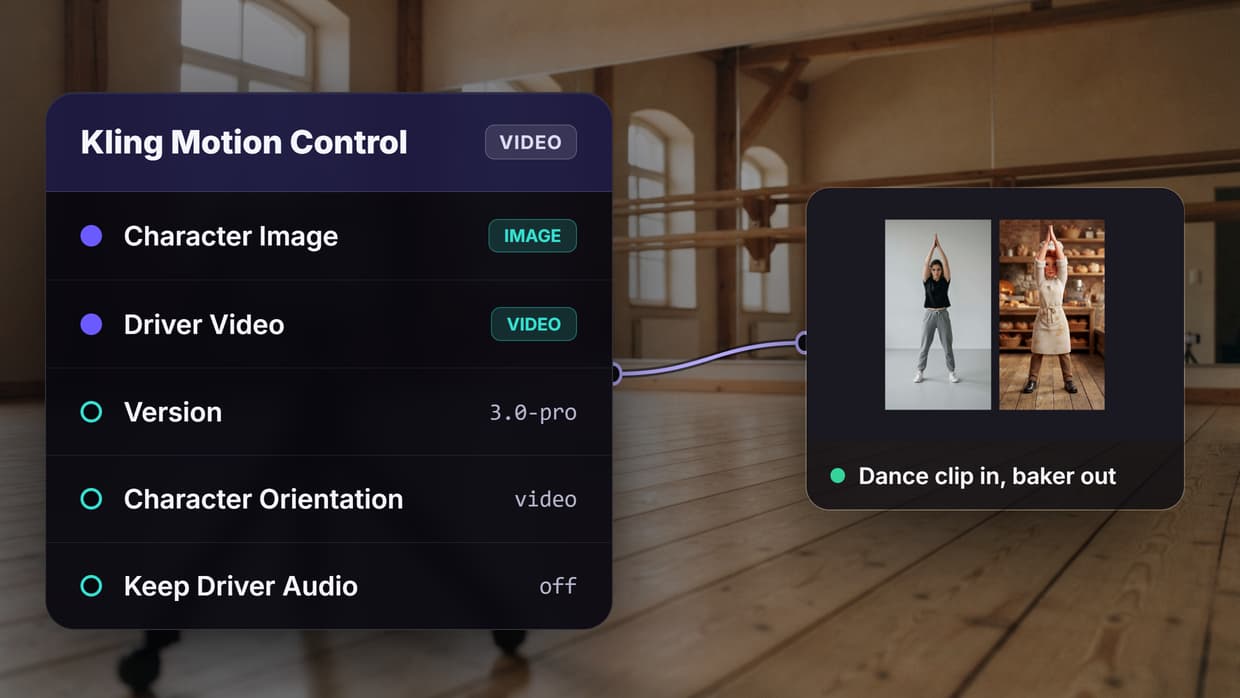
Kling Motion Control copies the movement in a reference video onto a character image, so a still character performs the same steps, gestures and timing. We tested it on Wireflow, the node-based AI canvas we make: one 5-second dance clip drove a 3D baker character through three settings, and this guide shows the exact prompts, the before and after clips, the credits and the time each run took.
What Kling Motion Control does
Most image-to-video models guess motion from a text prompt. Motion Control takes it from footage: you give it a character still and a driver video, and it maps the performer's body, hands and timing onto the character while the face, outfit and background come from the still. That suits a dance or a gesture that must land on the beat, which a prompt in a general image to video model rarely matches.
| Input or setting | What it does | What we used |
|---|---|---|
| Character Image | The character to animate | A 3D baker, 768x1376 |
| Driver Video | The motion to copy, 3 to 30 s | A 5-second dance clip |
| Prompt | Optional scene description | One sentence |
| Version | 3.0-pro, 3.0-standard, 2.6-pro, 2.6-standard | 3.0-pro and 3.0-standard |
| Character Orientation | video or image | Both |
| Keep Driver Audio | Copies the driver's sound | Off |
Build this in Wireflow
Make the same kind of asset on a canvas you control, with a free account and no credit card.
How we set up the test
Motion Control belongs to the same Kling 3.0 generation as Kling Video 3, but it takes its motion from a video instead of a prompt or start frame. We wired one character still and one driver clip into three copies of the Motion Control node and changed one setting per copy: A ran 3.0 Pro with orientation video, B ran 3.0 Standard with orientation video, and C ran 3.0 Pro with orientation image.
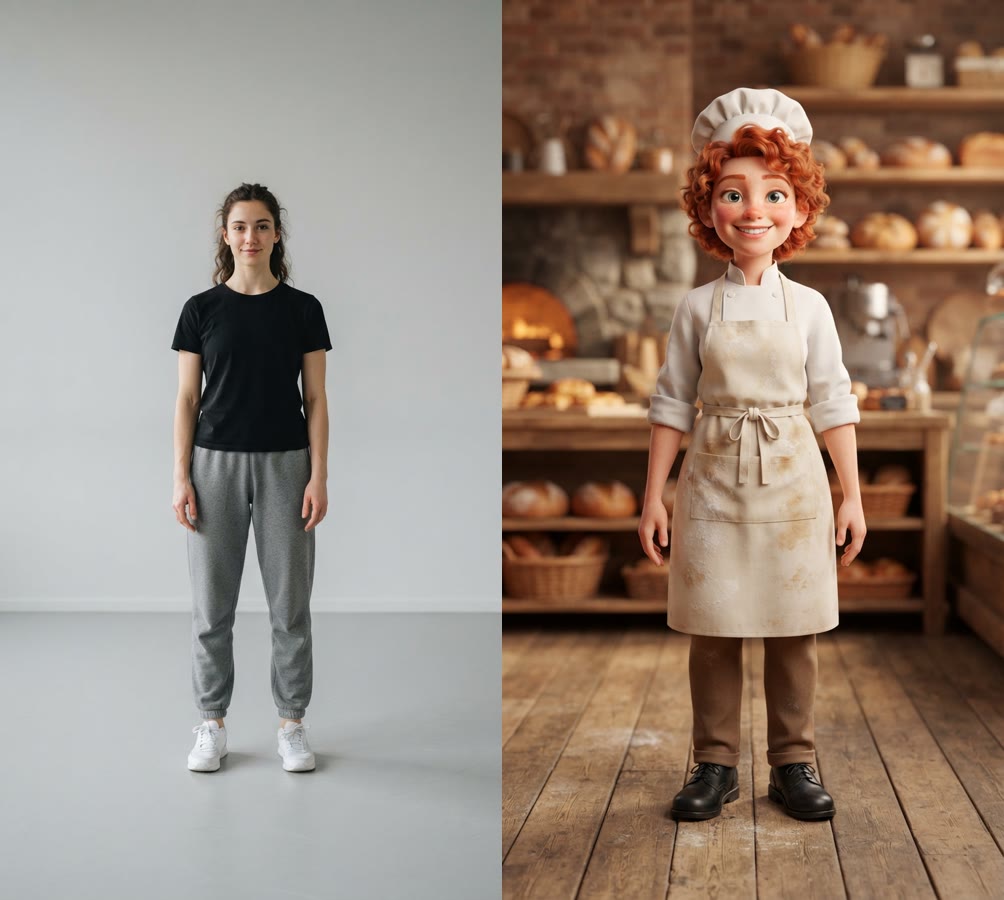
Both stills came from Nano Banana Lite at 9:16, full body and front-on, because matching the aspect ratio and framing of the two inputs is the most repeated tip in Motion Control guides. The baker keeps human proportions on purpose too: guides report warped limbs when a body differs a lot from the performer's, worth planning for when designing characters with AI for animation.
The four prompts, word for word:
Dancer photo: Real photo of a young woman dancer in a plain black t-shirt, gray joggers and white sneakers, standing in a relaxed neutral pose facing the camera, arms loose at her sides. Full body from head to shoes, centered, with space above her head and below her feet. Plain light gray studio wall and floor, soft even light, no shadows on the wall. Camera at waist height, 9:16 vertical. No text, no logos.
Driver motion (Kling O3, 5 seconds): Locked-off static camera, no camera movement, no zoom. The dancer performs a simple hip-hop groove: she steps side to side twice, rolls her shoulders, raises both arms above her head and claps twice, then points at the camera with her right hand. Her whole body stays in frame from head to shoes the entire time. Plain gray studio, even light.
Character: Stylized 3D animated character: a cheerful young baker with curly red hair, a white chef jacket with rolled sleeves, a flour-dusted cream apron, a small white chef hat, brown trousers and black shoes. Full body from hat to shoes, centered, standing upright facing the camera, arms relaxed at the sides, feet slightly apart, with space above the hat and below the shoes. Inside a small warm bakery, wooden bread shelves softly blurred behind. Soft even light, camera at waist height, 9:16 vertical. No text, no logos.
Motion Control scene prompt (all three): A cheerful baker dancing inside a small warm bakery, wooden bread shelves behind, soft morning light, steady camera.
We generated the driver so the test can be repeated from these prompts, and a phone clip of a real performer plugs into the same port. Making it was an ordinary step to animate an image, and Kling O3 performed the routine in order: side steps, an arm roll, palms pressed together overhead, then the right hand toward the camera. The scene prompt describes only the setting, because motion directions in the prompt can fight the driver.
Before and after: one driver clip, three settings

That loop is the unedited Video Editor render from the same graph; click it for the MP4. It works like comparing AI video models side by side: one input, several settings, one screen.
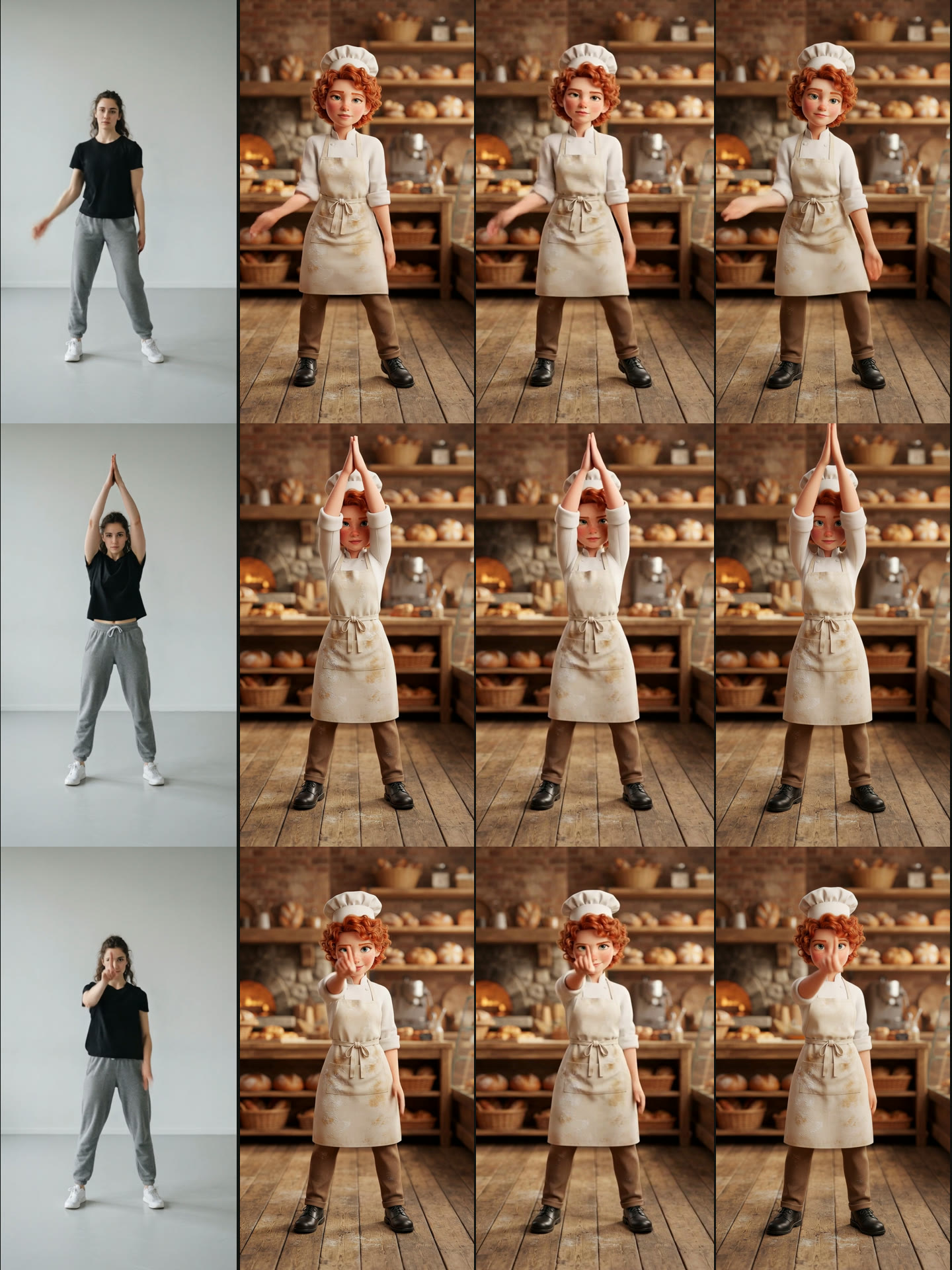
All three runs carried the whole routine onto the baker, and none changed the face, hat, apron or bakery between frames. A prompt-only AI video generator can describe a routine like this, but it has no footage to time each move against.
- A, 3.0 Pro, orientation video: the closest match; every sampled pose lines up with the dancer's and the hands stay sharp. 1072x1936, 30 fps, 5.03 seconds.
- B, 3.0 Standard, orientation video: the same timing at 720x1280. Fast moves blur: the hands smear in the clap in front of the face, and the freckles visible in A are lost.
- C, 3.0 Pro, orientation image: the same routine, but some arm moves came out simpler and a few frames off the driver around 2.5 seconds. The clip ran 4.8 seconds instead of 5.
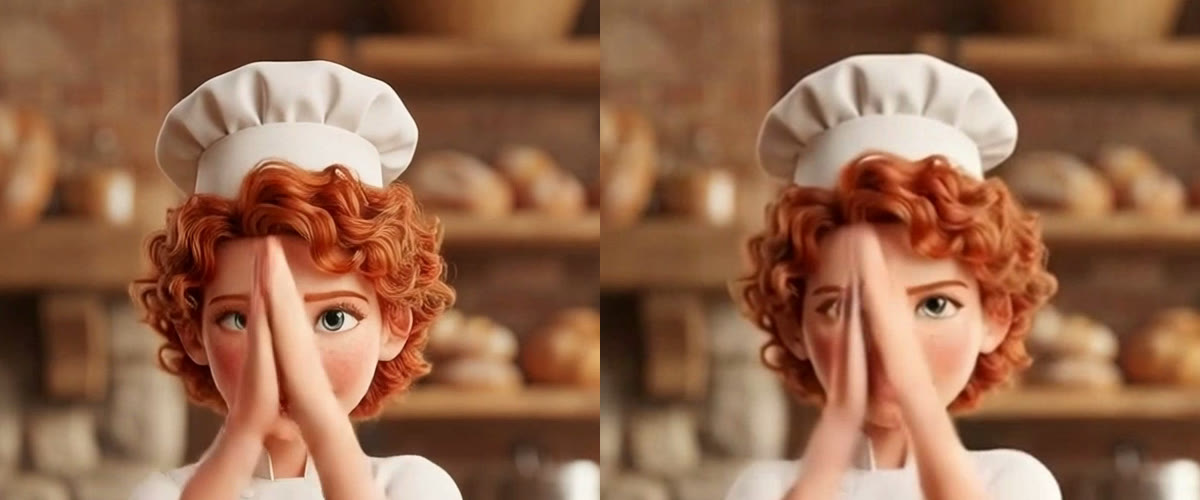
The crop shows where the Pro price goes: finger edges, curls and skin detail hold, while Standard softens them. B is fine for a phone feed; for anything cropped or upscaled, keep A. Kling's main 3.0 model has a Pro mode as well, covered in our Kling Video 3 review.
Cost and time from the run record
These figures come from the run records of this test on 17 October 2026. Motion Control bills per second of output, and the pre-run quote matched the charge exactly. For Kling's own plans, see our Kling AI pricing breakdown.
| Step | Model and setting | Time | Credits |
|---|---|---|---|
| Dancer photo and baker still | Nano Banana Lite, 9:16, in parallel | 22 s | 32 |
| Driver clip | Kling O3, 5 s | 64 s | 80 |
| A | Motion Control 3.0 Pro, video | 9 min 12 s | 135 |
| B | Motion Control 3.0 Standard, video | 3 min 55 s | 101 |
| C | Motion Control 3.0 Pro, image | 4 min 57 s | 135 |
| Before and after cut | Video Editor, 1920x1080 | 44 s after the last clip | 0 |
| Total | 11 min 35 s of run time | 483 |
Two Motion Control clips rendered at once and the third started when B finished, so all three were done 9 minutes 12 seconds after the run began. Pro works out to 27 credits per second and Standard to about 20; credit packs are on the pricing page.
The settings that mattered
Character orientation
Video makes the output follow the driver's orientation and allows up to 30 seconds; image keeps the orientation of your still, suits camera-led shots and caps at 10 seconds. Both our inputs faced the camera, so the results looked close, but orientation video tracked the driver more tightly. Pick video for dance; pick image when the pose in your still must survive, as when animating still images with other models.
Version
Pro gave the sharpest result for 135 credits per 5 seconds; Standard cost 101 and lost detail in fast moves. The node also offers the older 2.6 Pro and 2.6 Standard. Check a new driver and character pairing on Standard, then render the keeper on Pro. If Kling's look is wrong for the job, our Kling AI alternatives list covers other models.
Keep Driver Audio
On by default, it copies the driver's sound into the output in sync with the motion. Our driver was silent, so we turned it off. For a talking performance keep it on, or add speech later with one of the AI lip sync tools we have compared.
Prompt and face lock
Treat the prompt as a scene description: light, setting, camera. For a presenter whose face must not drift, wire a Face Frontal image plus up to three Face References, and refer to the face as @Element1 in the prompt. It needs 3.0 with orientation video and suits talking clips from a UGC video generator.
A driver clip checklist
Motion Control guides trace most failures to the driver: blocked limbs, blur, a shaky camera or framing that does not match the still. That holds for filmed and generated TikTok videos alike.
- Length: 3 to 30 seconds; 10 at most with orientation image.
- Framing: one person, limbs unblocked, the same crop and aspect ratio as the character still.
- Camera and background: locked off, plain and evenly lit. Ours transferred cleanly on all three runs.
- Check it first: watch a generated driver before spending 135 credits on a Pro run.
Try it yourself: Build this workflow in Wireflow. It holds every node from this test, from the dancer photo to the before and after cut. Change the character prompt, or wire your own clip into the Driver Video ports, and run.
FAQ
What is Kling Motion Control?
A Kling model that moves the motion in a reference video onto a character image. It runs in Kling's web app and through APIs such as the Kling AI API.
How long can the driver video be?
Between 3 and 30 seconds. With orientation set to image, the output caps at 10 seconds.
Should I use 3.0 Pro or 3.0 Standard?
Standard for tests, Pro for the final clip: 101 versus 135 credits per 5 seconds in our run. Our roundup of tools to compare AI video models side by side covers more ways to judge.
What does character orientation change?
Whether the output follows the driver's orientation (video, up to 30 seconds) or your still's (image, up to 10). In our test the difference was small.
Does it work with cartoon or 3D characters?
Yes. Our stylized 3D baker kept its face and outfit in every frame. Human-like proportions transfer best; see our guide to creating AI characters.
Can I run Motion Control from code?
Yes. A saved graph runs from one API call with a new character or driver, the same pattern as generating Kling videos via API.
Conclusion
Kling Motion Control put one exact 5-second routine on a new character three times without losing the character. Orientation video on 3.0 Pro gave the closest copy, and Standard saved a quarter of the cost at lower sharpness. The whole test ran as one Wireflow graph, so the next character is a prompt change in the same AI video pipeline.

Co-Founder & Operations at Wireflow
Runs client operations and content strategy at Wireflow. Works directly with creative teams and agencies to build production AI workflows.
- Content Strategy
- Client Operations
Get unlimited ad creatives today.
One call to see if we are a fit and scope the first ad. If it fits, your first batch lands inside week one.