Remotion Templates: Where to Find Them and How to Fill Them With AI Footage

In this article▾
Remotion templates are ready-made React video projects and scene components that you copy, edit and render. Remotion's own site lists 19 free starters and 3 paid ones, and the largest community collection adds 81 MIT-licensed scenes. Every one still needs footage, images and a voice track before it becomes a video. This guide covers where to find templates, what they expect as input, and how to generate those inputs with a pipeline you can run in Wireflow.
What a Remotion template actually is
Remotion is a framework for making videos with React. Each frame is a render of a component at a given frame number, read through useCurrentFrame, and animation comes from helpers like interpolate and spring instead of a timeline. A template is therefore ordinary code you can version, feed data and render from a script, the core idea behind writing video as code.
Templates come in two shapes:
- Project starters. A full project you scaffold with
npx create-video@latest, such as Hello World, the Next.js SaaS starter or the Render Server. - Scene components. A single
.tsxfile, like a lower third, a bar chart or a glitch title, that you copy into an existing project and register as a composition.

Both shapes hold layout, timing and motion, but not the content. Text, image URLs, video sources, audio and caption timings arrive as props, usually typed with a schema so they can be edited in Remotion Studio or passed at render time. That split lets one template produce hundreds of videos; for animation that needs no code, compare the AI tools for motion graphics design.
Build this in Wireflow
Make the same kind of asset on a canvas you control, with a free account and no credit card.
Where to find Remotion templates
There are four main sources, and they differ in what you get and what you may do with it. If you also need hosted rendering, start with our list of Remotion API tools.
| Source | What you get | Count | Cost and license |
|---|---|---|---|
| Remotion's templates page | Project starters for apps, audio, captions, 3D and AI video | 19 free, 3 paid | Free starters; Remotion's own license applies |
| reactvideoeditor/remotion-templates on GitHub | Single-file scene components in 9 categories | 81 | MIT |
| Remotion's community resources list | Packs such as RenderComp Free (50 templates), SwiftClip (30) and Onda (70 components) | About 150 entries | Varies by project |
| Paid packs | Editor Starter, Watercolor Map and Timeline from Remotion, plus third-party sellers | Varies | Paid |

The official templates, grouped by job
| Job | Official free templates |
|---|---|
| Start from scratch | Blank, Hello World |
| Build a video app | Next.js, Next.js (Vercel Sandbox), React Router 7, Electron, Render Server (Express.js), Recorder |
| Audio and podcasts | Audiogram, Music Visualization |
| Social clips | TikTok (word-by-word captions), Overlay, Stargazer |
| AI-generated video | Prompt to Video, Prompt to Motion Graphics SaaS Starter Kit |
| Graphics and stills | 3D (React Three Fiber), Skia, Stills, Code Hike |
The paid tier targets teams building editors: Editor Starter is a boilerplate for a custom video editor, and the Timeline component adds timeline-based editing. Remotion itself is free for individuals, non-profits and for-profit companies with up to three employees; larger companies need a company license, whichever template they use. If an AI coding agent will edit your templates, see our roundup of Remotion tools for coding agents.
Community collections
The biggest free set is the reactvideoeditor collection: 81 components across nine categories, from bar charts and stat counters to whip pans, logo reveals, lower thirds and credit rolls. Each is a self-contained component built only on Remotion hooks, so you copy the file, register it in a composition and adjust its props. The README does not document per-template props, so expect to read the source, or hand that job to an agent as in this LLM video editing workflow.
The gap: templates are empty until you fill them
The TikTok template needs a voice track and word-level timings. Audiogram needs an audio file and a cover image. Ken Burns and Polaroid Frame need photos, and a lower third needs footage to sit on. The template supplies the motion, but you still source every asset, which is where image and video models come in, starting with animating still images through an API.
| Template slot | Typical prop | Where an AI pipeline gets it |
|---|---|---|
| Background or hero clip | Video source URL | An image-to-video model animating a generated frame |
| Product shot, cover or outro card | Image source URL | An image model such as GPT Image 2.5 Flare or Nano Banana Lite |
| Voiceover | Audio source URL | A text-to-speech voice model |
| Captions | Word timing array | Word timings taken from the voice track |
| Headline and lower-third text | String props | A text input or an LLM node |
The official Prompt to Video template turns a prompt into a story with images and voiceover, but it is still a code project you host, connect to model providers and maintain yourself. The voice provider is a separate choice; our list of ElevenLabs alternatives compares the main options.
Step by step: generate the inputs and compose the template
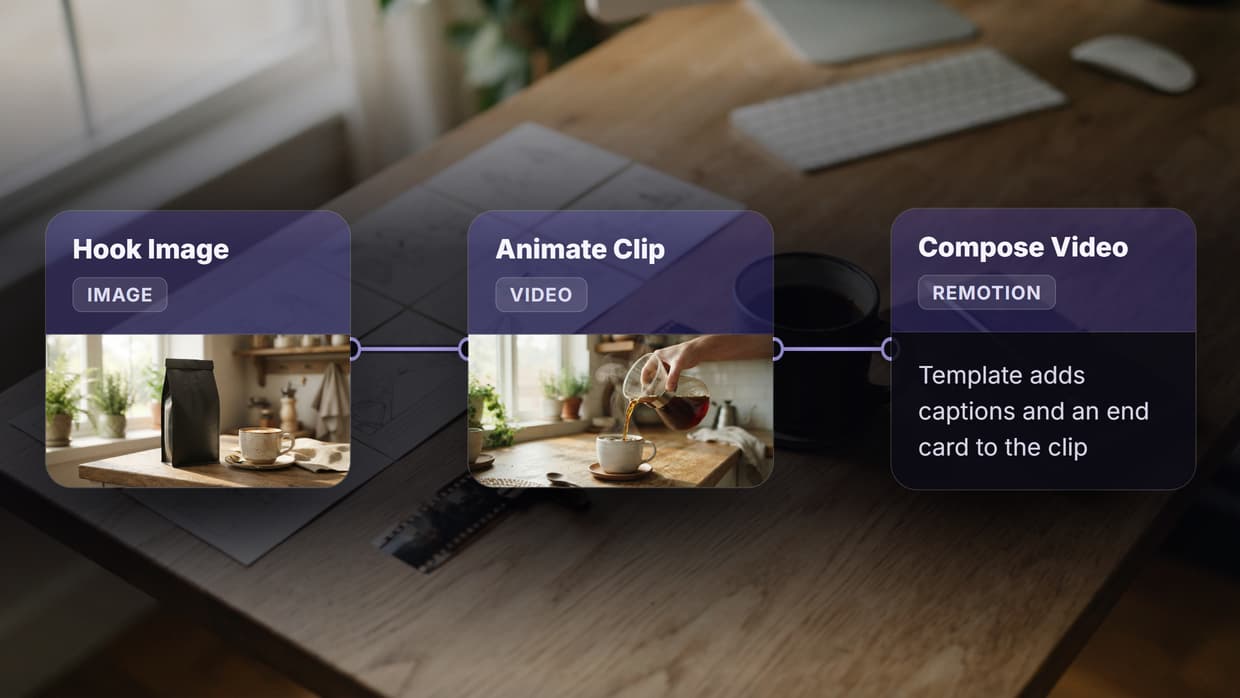
The workflow below runs the chain on one canvas: two text inputs, an image model, a video model and a Compose Video node that applies a Remotion scene graph to the generated media. If you want the video without owning the React project, it doubles as a Remotion alternative with no render servers to run.
- Scene Brief (text input). One line describing the opening frame, such as "a golden sunrise over a misty mountain lake, cinematic wide shot."
- Motion Prompt (text input). The camera move, such as "slow dolly forward over the lake as mist drifts."
- Opening frame (GPT Image 2.5 Flare). Renders the brief as a 16:9 image. It is both the clip's first shot and the outro card.
- Clip (Gemini Omni Flash 1.1). Animates the frame into a 5-second 720p clip that follows the motion prompt.
- Assemble MP4 (Compose Video). Applies the template: a 1920x1080, 30 fps scene graph that plays the clip for 150 frames with a caption at the bottom, then holds the opening frame for 90 frames under a "Thanks for Watching" title. The output is an 8-second MP4 plus a thumbnail.

The scene graph plays the role of the template. Captions, fonts, colors, scene order, durations and transitions are config values, so changing the copy or adding a scene does not touch the media nodes. Swapping a model is a single node change, and the model library lists the alternatives.

A preview call renders up to five sample frames, flags layout issues and costs no credits, so you can fix a clipped caption before the paid render. The "ad" and "email" delivery presets keep the MP4 under 8 MB, which helps when one template feeds a bulk video ad pipeline.
The flow above has no voice yet, but the Compose Video node has audio and captions input ports. Adding a text-to-speech node and a word-timing node gives it the same inputs the TikTok template expects. Teams that drive this from an agent can test voices first with the ElevenLabs MCP tools.
Code template or composed pipeline: which fits
Both approaches end in a Remotion render; the difference is who edits it and who runs the render. If you like the React route but not the infrastructure, read our guide to running Remotion without self-hosting.
| Remotion code template | Composed pipeline (scene graph) | |
|---|---|---|
| Who edits it | A React developer or coding agent | Anyone who can change config values |
| Motion control | Any animation you can code, frame-exact | Scenes, overlays, captions and transitions |
| Assets | Bring your own files or URLs | Generated upstream in the same flow |
| Rendering | Your machine, a render server or Remotion Lambda | Hosted, with nothing to deploy |
| Best for | Data-driven video, charts and custom effects | Promos, ads and social clips from generated media |
| Cost | Hosting, plus a company license for larger teams | Pay per generation |
Pick the code template when the video is driven by data, needs frame-exact timing or uses custom effects like the community chart components. Pick the composed pipeline when the bottleneck is producing footage and voice rather than animating them. The two also combine: keep custom components in React and generate the media that feeds them, or see our Remotion alternatives for other splits.
Tips for choosing and adapting a template
A few checks save rework, whether the render runs locally or in a headless video editor:
- Match the canvas first. Use 1080x1920 for Reels, TikTok and Shorts and 1920x1080 for YouTube. Resizing later breaks layouts built on absolute positions.
- Move hardcoded text into props. Many community components ship with sample strings; typed props let a script, agent or pipeline fill them.
- Test with a still. Render one frame or a preview first to catch clipped text and missing fonts.
- Keep assets as URLs. Templates that read media from URLs plug straight into generated outputs; local file imports need a rebuild for every new asset.
Getting started
Start with one caption or lower-third template, generate five clips from five scene briefs, and compare the time per finished video against your current process before scaling up. Generation costs are on the pricing page, so you can estimate a batch before you run it.
Try it yourself: open the Scene Brief to Captioned MP4 workflow in Wireflow to see the five nodes and the opening frame they produced, then run it with your own scene brief and caption.
FAQ
Are Remotion templates free?
The 19 official starters and the 81-component reactvideoeditor collection (MIT) are free; three official templates are paid. Remotion itself needs a company license above three employees. For template-driven video through an API instead of code, see our JSON2Video alternatives.
How do I start a project from a Remotion template?
Run npx create-video@latest and choose a template from the list. For single-file components, copy the file into an existing project, register it as a composition with a duration, fps and size, and set its props. A coding agent can do these steps for you, as in connecting Claude to video editing.
Can I use Remotion templates without knowing React?
Only lightly. You can change typed props in Remotion Studio, but structural edits need code. A scene graph in a node-based compose step works through config values instead, which suits creators who do not code.
Which Remotion template is best for short-form captions?
The official TikTok template animates captions word by word from a voice track with word-level timings. For more styles, the reactvideoeditor Text category includes Typewriter Subtitle and Bounce Text. Our list of AI tools for TikTok UGC ads covers the content side.
Can AI generate the footage and voice for a Remotion template?
Yes. Generate a frame with an image model, animate it with a video model, add a text-to-speech voiceover, and pass the output URLs into the template's props. Running those steps as one chain is covered in how to chain multiple AI models in one API call.
How do I render Remotion templates at scale?
Remotion offers Lambda rendering on AWS and an Express.js Render Server template, and both need setup and upkeep. Hosted compose steps avoid that; our list of hosted video APIs for agents compares the options.

Co-Founder & Operations at Wireflow
Runs client operations and content strategy at Wireflow. Works directly with creative teams and agencies to build production AI workflows.
- Content Strategy
- Client Operations
Get unlimited ad creatives today.
One call to see if we are a fit and scope the first ad. If it fits, your first batch lands inside week one.